> For the complete documentation index, see [llms.txt](https://wiki.redmodding.org/cyberpunk-2077-modding/llms.txt). Markdown versions of documentation pages are available by appending `.md` to page URLs; this page is available as [Markdown](https://wiki.redmodding.org/cyberpunk-2077-modding/for-mod-creators-theory/core-mods-explained/archivexl/archivexl-dynamic-materials.md).
# ArchiveXL: dynamic materials
How to use ArchiveXL's new material property interpolation
## Summary
**Published:** May 01 2024 by [mana vortex](mailto:undefined)\
**Last documented update:** May 01 2024 by [mana vortex](mailto:undefined)
## Prerequistes
* [ArchiveXL](https://www.nexusmods.com/cyberpunk2077/mods/4198) >= 1.13 — this will **not work** with older versions
### Assumed skill level
* You have a general understanding of how materials work (or read up on it under [3d objects: .mesh files](/cyberpunk-2077-modding/for-mod-creators-theory/files-and-what-they-do/file-formats/3d-objects-.mesh-files.md#material-assignment))
* You have a Wolvenkit project and a mesh as well as a bunch of .mlsetups
## Why is this better than [.mi files](/cyberpunk-2077-modding/for-mod-creators-theory/files-and-what-they-do/file-formats/materials/re-using-materials-.mi.md)?
Because it's even lazier: For a mesh with 15 appearances, you need...
| | legacy | dynamic materials |
| ----------------------- | ------ | ----------------------------------- |
| Appearances | 15 | 15 |
| mlmask files | 1 | 1 |
| mlsetup fil,es | 15 | 15 |
| #`materialEntries` | 15 | 1 |
| #`CMaterialInstances` | 15 | 1 |
| #`chunkMaterials` lists | 15 | 1 |
{% hint style="success" %}
To be **even lazier**, check out [ArchiveXL: Resource patching](/cyberpunk-2077-modding/for-mod-creators-theory/core-mods-explained/archivexl/archivexl-resource-patching.md) and [ArchiveXL: Resource linking](/cyberpunk-2077-modding/for-mod-creators-theory/core-mods-explained/archivexl/archivexl-resource-linking.md)!
{% endhint %}
## The problem
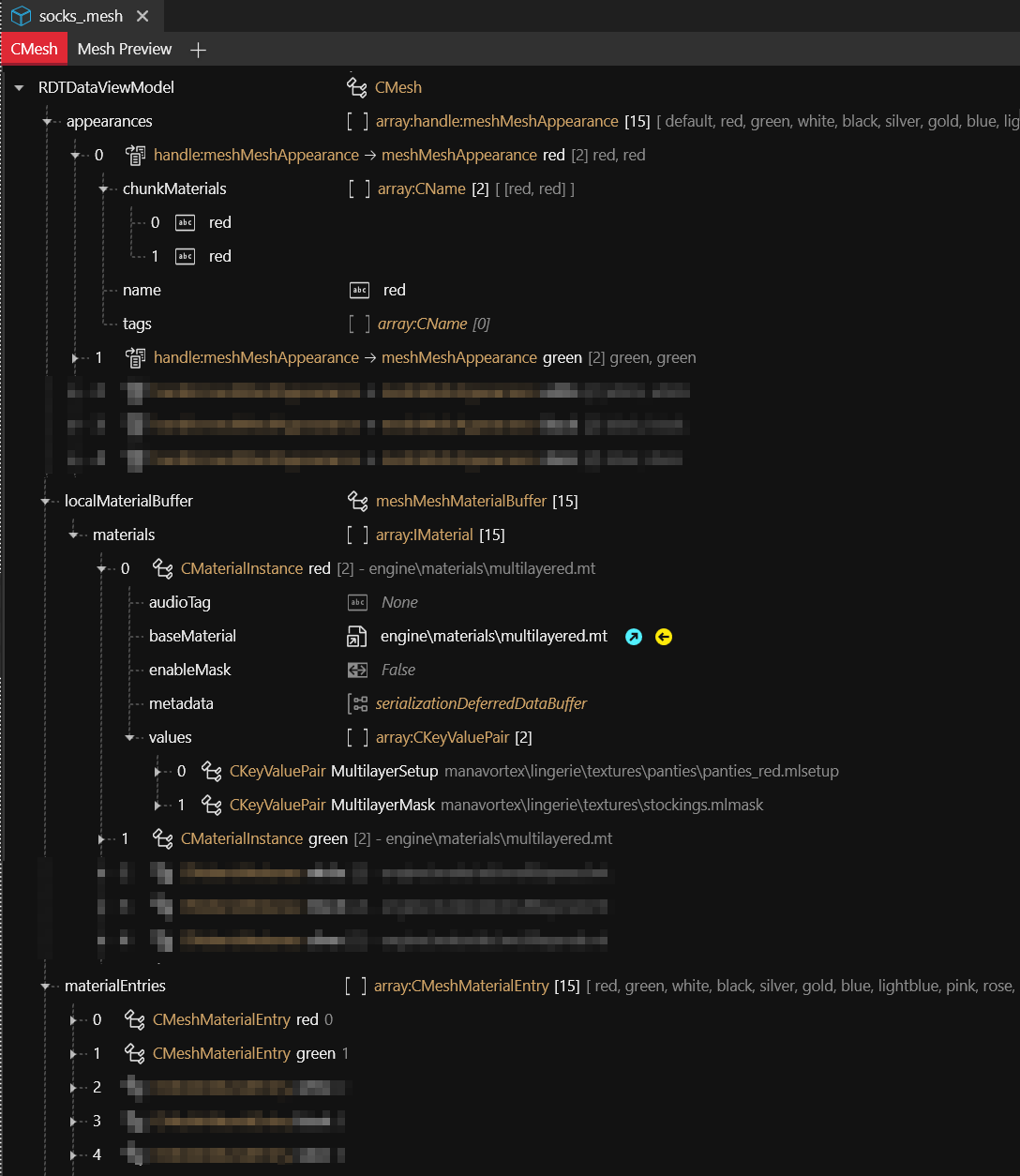
Normally, your materials look like this: a bunch of different appearances with the same `.mlmask`, but one `.mlsetup` file for each colour:
The more variations you have, the more duplication you have, because you need to register a `materialEntry` for each material, and then create a material for each of those. Traditionally, you do that by duplicating the last entry and changing the depot path. Tedious and not fun, right?
This is where the new technique kicks in.
## Step 1: Dynamic material assignments
We start by changing our `chunkMaterial` names. By appending the suffix `@dynamic`, we're telling ArchiveXL to map them to the `CMeshMaterialEntry` with the same name.
{% hint style="info" %}
You can use any suffix and it will match up any material - e.g., if you'd use `red@stitches`, the corresponding material would be `@stitches`.
{% endhint %}
Instead of 15 `materialEntries`, we're down to one.
## Step 2: the material instance
Now, we need to adjust the material instances. We can delete all but one, since our `@dynamic` will contain everything that we need.
{% hint style="warning" %}
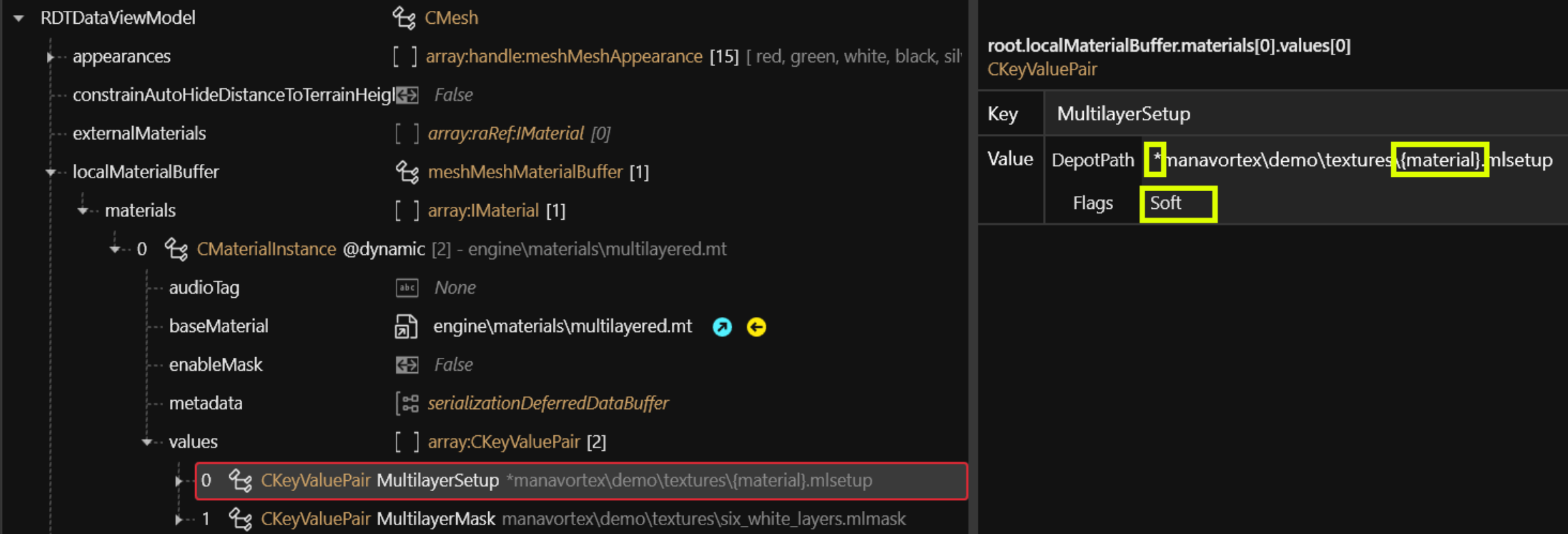
The Flags for any dynamic material must be set to `Soft`, and the depot path must start with a \*. [File Validation](https://wiki.redmodding.org/wolvenkit/wolvenkit-app/file-validation) will warn you about this.
{% endhint %}
Since that one won't change, we can leave the `MultilayerMask` alone. For the MultilayerSetup, we need to change both the `DepotPath`:
* By making the depot path start with a `*`, we tell ArchiveXL that this is a dynamic material
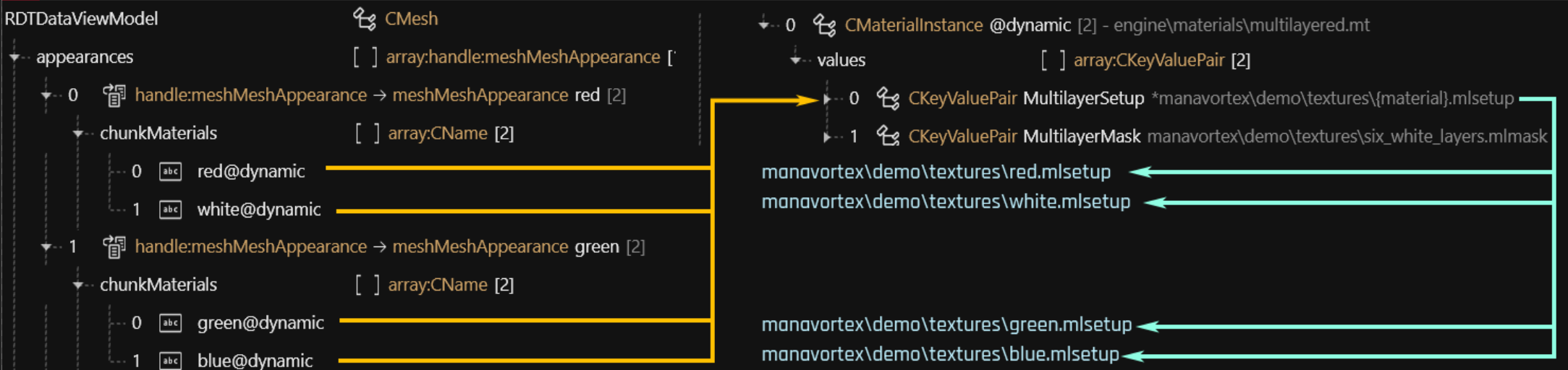
* The value for `{material}` will be passed from the appearance, like this:
... and the rest just works.
{% hint style="success" %}
You can use dynamic interpolation in pretty much everything — base material paths or material properties. Just remember to set your Flags to `Soft`, or it will fail.
{% endhint %}
## Step 3: Appearance expansion
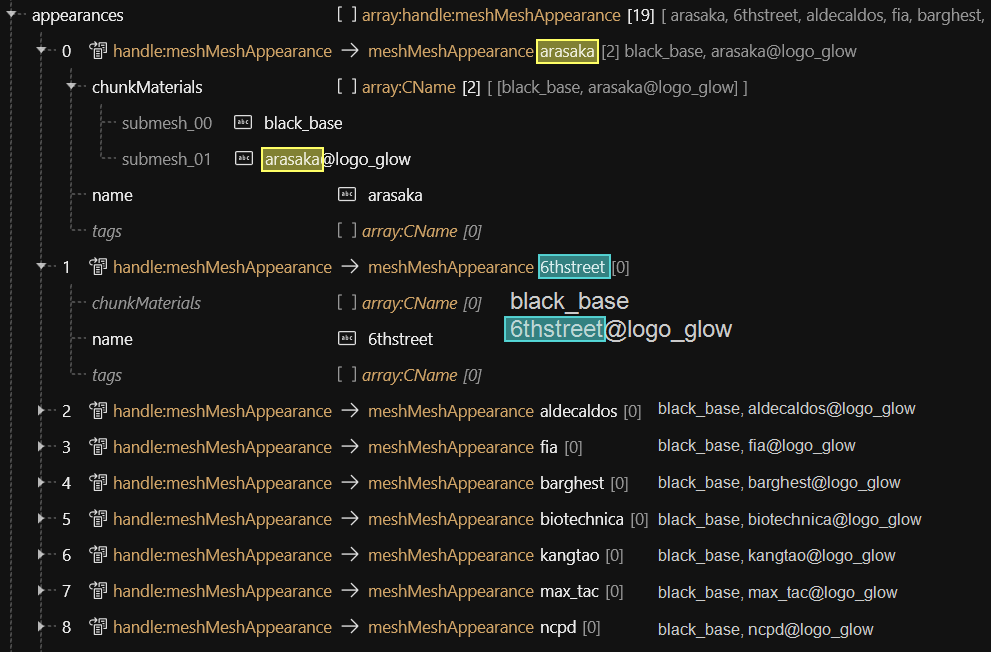
But wait, there's more. After using dynamic materials, we've been able to reduce the number of material entries and instances, but there is still a lot of repetition between the appearances - if you've followed this guide so far, each of your appearances has a `chunkMaterials` list that looks the same as all the others except for the different material name. It would be great if we could get rid of that repetition, and we can, with Appearance Expansion.
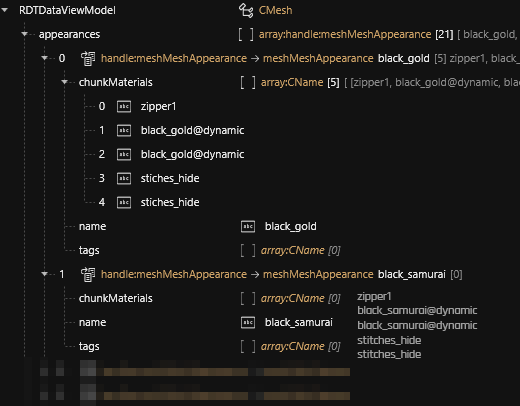
And it's very simple to do. You simply assign empty `chunkMaterials` lists to all your appearances except the first one, and ArchiveXL will automatically use the first appearance as a template and generate the `chunkMaterials` list by substituting the appearance name:
Now, you only have to maintain one chunk list, and the rest of your appearances are simplified down to a single name and nothing else.
{% hint style="info" %}
To use appearance expansion for patch meshes, you should add the **template name** to the empty appearance's tags. In our example above, that would be `black_gold`.
{% endhint %}
#### Mesh Appearance: Auto Expansion
Here's another example:
Any appearances **without `chunkMaterials`** that come directly after the first one will use that as a template for **appearance expansion**.
Internally, ArchiveXL will **copy the `chunkMaterials`**, then **replace the appearance name**.
```
arasaka 6thstreet
- black_base - black_base
- arasaka@logo_glow - 6thstreet@logo_glow
- third_chunk_material - third_chunk_material
arasaka 6thstreet
- black_base - black_base
- arasaka_logo@logo_glow - 6thstreet_logo@logo_glow
- third_chunk_material - third_chunk_material
```
## Additional intel
### Dynamic materials and .mi files
To use `{material}` substitution inside .mi files, the reference must be sent to `Soft`. This works even if you do not use substitution in the path to the .mi file!
{% hint style="info" %}
[File Validation](https://wiki.redmodding.org/wolvenkit/wolvenkit-app/file-validation) may warn you about the soft references. However, in this case, its warning can be ignored.
{% endhint %}
####
---
# Agent Instructions
This documentation is published with GitBook. GitBook is the documentation platform designed so that both humans and AI agents can read, navigate, and reason over technical content effectively. Learn more at gitbook.com.
## Querying This Documentation
If you need additional information that is not directly available in this page, you can query the documentation dynamically by asking a question.
Perform an HTTP GET request on the current page URL with the `ask` query parameter, and the optional `goal` query parameter:
```
GET https://wiki.redmodding.org/cyberpunk-2077-modding/for-mod-creators-theory/core-mods-explained/archivexl/archivexl-dynamic-materials.md?ask=&goal=
```
`ask` is the immediate question: it should be specific, self-contained, and written in natural language.
`goal` is optional and describes the broader end goal you are ultimately trying to accomplish on behalf of the user. GitBook uses it to tailor the answer towards what is most useful for that goal.
The response will contain a direct answer to the question and relevant excerpts and sources from the documentation.
Use this mechanism when the answer is not explicitly present in the current page, you need clarification or additional context, or you want to retrieve related documentation sections.