# Textures, Materials and Shaders
This is the landing page for **materials** in Cyberpunk 2077. It contains a definition and a rough overview.
{% hint style="info" icon="arrow-left" %}
Check the section's sub pages in the wiki's navigation tree for more detailed information about the different kinds of materials. Additional material-related information can be found here:
{% endhint %}
#### General information
* Handy list of references: [cheat-sheet-materials](https://wiki.redmodding.org/cyberpunk-2077-modding/for-mod-creators-theory/references-lists-and-overviews/cheat-sheet-materials "mention")
* Re-using materials as templates: [re-using-materials-.mi](https://wiki.redmodding.org/cyberpunk-2077-modding/for-mod-creators-theory/files-and-what-they-do/file-formats/materials/re-using-materials-.mi "mention")
* How it works in the example: [https://github.com/CDPR-Modding-Documentation/Cyberpunk-Modding-Docs/blob/main/for-mod-creators/files-and-what-they-do/3d-objects-.mesh-files](https://github.com/CDPR-Modding-Documentation/Cyberpunk-Modding-Docs/blob/main/for-mod-creators/files-and-what-they-do/3d-objects-.mesh-files "mention")
#### Multilayered
* General information: [multilayered](https://wiki.redmodding.org/cyberpunk-2077-modding/for-mod-creators-theory/materials/multilayered "mention")
* Properties and definition: [https://github.com/CDPR-Modding-Documentation/Cyberpunk-Modding-Docs/blob/main/for-mod-creators-theory/materials/broken-reference/README.md](https://github.com/CDPR-Modding-Documentation/Cyberpunk-Modding-Docs/blob/main/for-mod-creators-theory/materials/broken-reference/README.md "mention")
* Preview images: [multilayered-previews](https://wiki.redmodding.org/cyberpunk-2077-modding/for-mod-creators-theory/materials/multilayered/multilayered-previews "mention")
#### Hands-on:
* [changing-materials-colors-and-textures](https://wiki.redmodding.org/cyberpunk-2077-modding/modding-guides/items-equipment/editing-existing-items/changing-materials-colors-and-textures "mention") (guide)
* [self-made-normal-maps](https://wiki.redmodding.org/cyberpunk-2077-modding/modding-guides/textures-and-luts/self-made-normal-maps "mention")
* [blending-materials-for-more-gooder-colours](https://wiki.redmodding.org/cyberpunk-2077-modding/for-mod-creators-theory/materials/multilayered/blending-materials-for-more-gooder-colours "mention")
## Definition: Shader
In its original state, a [https://github.com/CDPR-Modding-Documentation/Cyberpunk-Modding-Docs/blob/main/for-mod-creators/files-and-what-they-do/3d-objects-.mesh-files](https://github.com/CDPR-Modding-Documentation/Cyberpunk-Modding-Docs/blob/main/for-mod-creators/files-and-what-they-do/3d-objects-.mesh-files "mention") is a collection of **vertices** (pixels). The space between those vertices is filled by **faces**, which form the 3d object's surface.
The shader is the thing that goes on top of the surface, rendering a **material** such as glass, skin, concrete, steel…
{% hint style="info" %}
Without a shader, objects would be invisible in the game, the surface simply being transparent. In Cyberpunk, a default shader will be assigned in such cases (such as debug\_coloring.mt).
{% endhint %}
In Cyberpunk 2077, REDEngine shaders are implemented as `.mt`/`.remt` files.
### How can I use shaders?
If you have ever messed with an item's materials, then you already have.
To use a shader, you create a **Material Instance**, where you can configure the **parameters**.\
Not every parameter of a shader can be configured: since skin always has subsurface scattering, it makes no sense to tweak this. But since skin color already varies dramatically if you don't throw exotic chrome into the mix, you can change them easily via tint.
## Definition: Material
{% hint style="info" %}
For details how materials are used on a mesh, see the [https://github.com/CDPR-Modding-Documentation/Cyberpunk-Modding-Docs/blob/main/for-mod-creators/files-and-what-they-do/3d-objects-.mesh-files](https://github.com/CDPR-Modding-Documentation/Cyberpunk-Modding-Docs/blob/main/for-mod-creators/files-and-what-they-do/3d-objects-.mesh-files "mention"), or learn how materials can be defined in a mesh via [https://github.com/CDPR-Modding-Documentation/Cyberpunk-Modding-Docs/blob/main/for-mod-creators/files-and-what-they-do/3d-objects-.mesh-files#materialinstance-the-local-material](https://github.com/CDPR-Modding-Documentation/Cyberpunk-Modding-Docs/blob/main/for-mod-creators/files-and-what-they-do/3d-objects-.mesh-files#materialinstance-the-local-material "mention") or loaded externally from
{% endhint %}
**In the context of Cyberpunk**, a material is the thing that lets the shader define the surface properties of a [https://github.com/CDPR-Modding-Documentation/Cyberpunk-Modding-Docs/blob/main/for-mod-creators/files-and-what-they-do/3d-objects-.mesh-files](https://github.com/CDPR-Modding-Documentation/Cyberpunk-Modding-Docs/blob/main/for-mod-creators/files-and-what-they-do/3d-objects-.mesh-files "mention"). Typically, you create a local instance, which will then pull in a shader via `baseMaterial`.
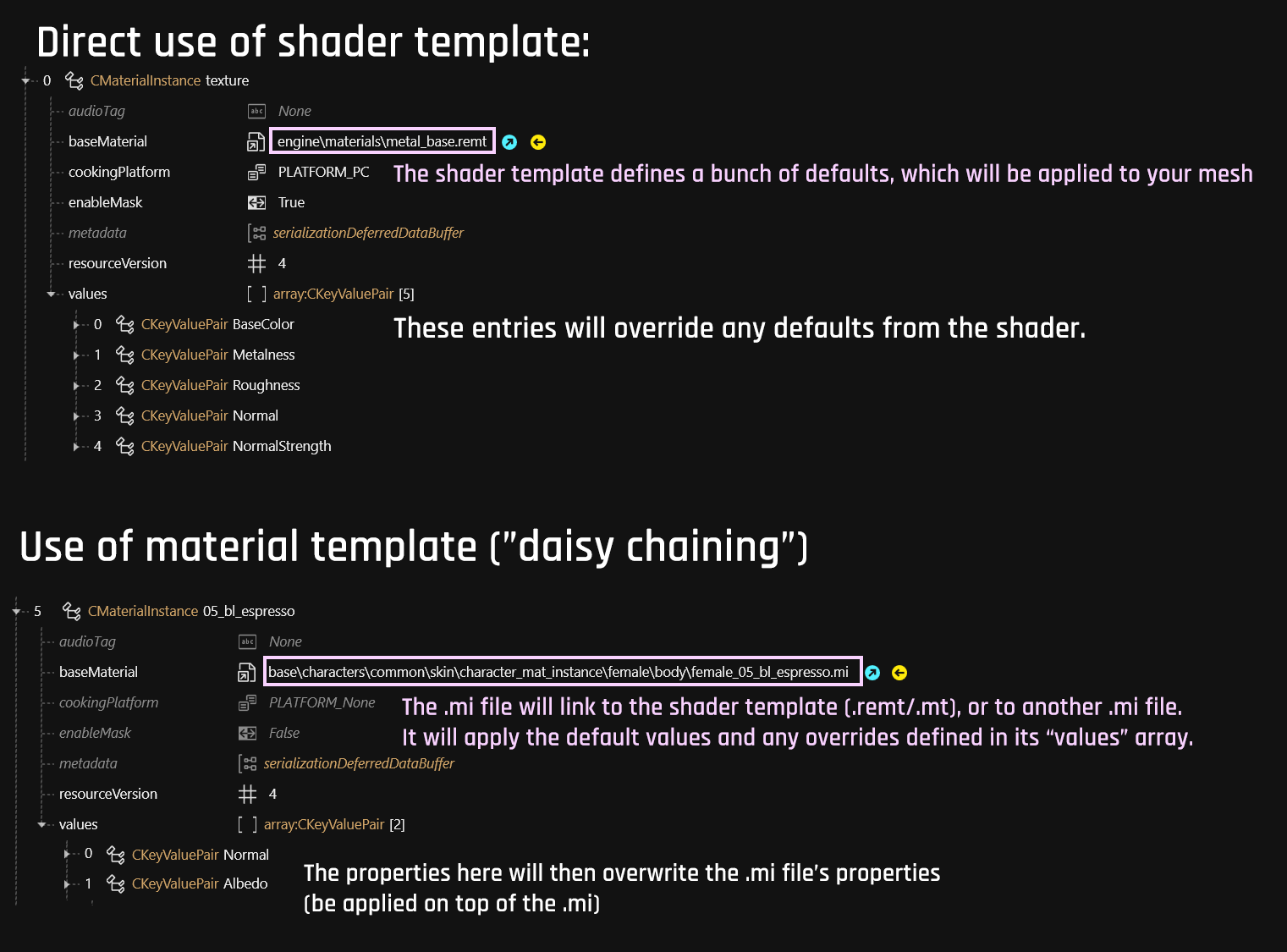
The property `baseMaterial` can point at a `.mt` / `.remt` file directly, or to an intermediary `.mi` file:
### The .mi file
{% hint style="info" %}
Each part of a mesh (submesh) can have a different material assigned.
Do you want to know more? ( =>[https://github.com/CDPR-Modding-Documentation/Cyberpunk-Modding-Docs/blob/main/for-mod-creators/files-and-what-they-do/3d-objects-.mesh-files#chunkmaterials](https://github.com/CDPR-Modding-Documentation/Cyberpunk-Modding-Docs/blob/main/for-mod-creators/files-and-what-they-do/3d-objects-.mesh-files#chunkmaterials "mention"))
{% endhint %}
{% hint style="success" %}
For a hands-on guide and something to play around/experiment with, check [textured-items-and-cyberpunk-materials](https://wiki.redmodding.org/cyberpunk-2077-modding/modding-guides/textures-and-luts/textured-items-and-cyberpunk-materials "mention").
{% endhint %}
## What kinds of material exist?
### Textured
If you have modded other games, you're used to PBR materials with a bunch of textures like **diffuse**, **normal,** **metalness** etc.
See [cheat-sheet-materials](https://wiki.redmodding.org/cyberpunk-2077-modding/for-mod-creators-theory/references-lists-and-overviews/cheat-sheet-materials "mention") -> [#pbr-material](https://wiki.redmodding.org/cyberpunk-2077-modding/references-lists-and-overviews/cheat-sheet-materials#pbr-material "mention") for a list.
{% hint style="success" %}
To change a textured material, see [changing-materials-colors-and-textures](https://wiki.redmodding.org/cyberpunk-2077-modding/modding-guides/items-equipment/editing-existing-items/changing-materials-colors-and-textures "mention") -> [#step-2-finding-the-correct-appearance](https://wiki.redmodding.org/cyberpunk-2077-modding/modding-guides/items-equipment/editing-existing-items/changing-materials-colors-and-textures#step-2-finding-the-correct-appearance "mention")
{% endhint %}
{% hint style="info" %}
Did you know? You can make Cyberpunk's default textured material glow.
{% endhint %}
### Multilayered
This is specific to Cyberpunk, and it is incredibly cool. If you're used to textured materials, you're probably going to hate it at first, but it has incredible versatility and re-usability.
{% hint style="success" %}
* What is a multilayered material and how does [multilayered](https://wiki.redmodding.org/cyberpunk-2077-modding/for-mod-creators-theory/materials/multilayered "mention") work?
* What are these [properties](https://github.com/CDPR-Modding-Documentation/Cyberpunk-Modding-Docs/blob/main/for-mod-creators-theory/materials/broken-reference/README.md), how do I use them?
* [Changing the colours](https://wiki.redmodding.org/cyberpunk-2077-modding/modding-guides/items-equipment/editing-existing-items/changing-materials-colors-and-textures#multilayered-material)
* [Changing the mask](https://wiki.redmodding.org/cyberpunk-2077-modding/modding-guides/textures-and-luts/custom-multilayermasks)
{% endhint %}
### Decal
A decal material is applied to a decal (sub)mesh, which is located on the surface of another mesh like a sticker.
Check out our guide on [adding-decals](https://wiki.redmodding.org/cyberpunk-2077-modding/modding-guides/items-equipment/editing-existing-items/adding-decals "mention") for further explanation and detail.
### Emissive
There are various kinds of emissive materials. See [cheat-sheet-materials](https://wiki.redmodding.org/cyberpunk-2077-modding/for-mod-creators-theory/references-lists-and-overviews/cheat-sheet-materials "mention") -> [#emissive-materials](https://wiki.redmodding.org/cyberpunk-2077-modding/references-lists-and-overviews/cheat-sheet-materials#emissive-materials "mention") for a list.
## Material wireframes
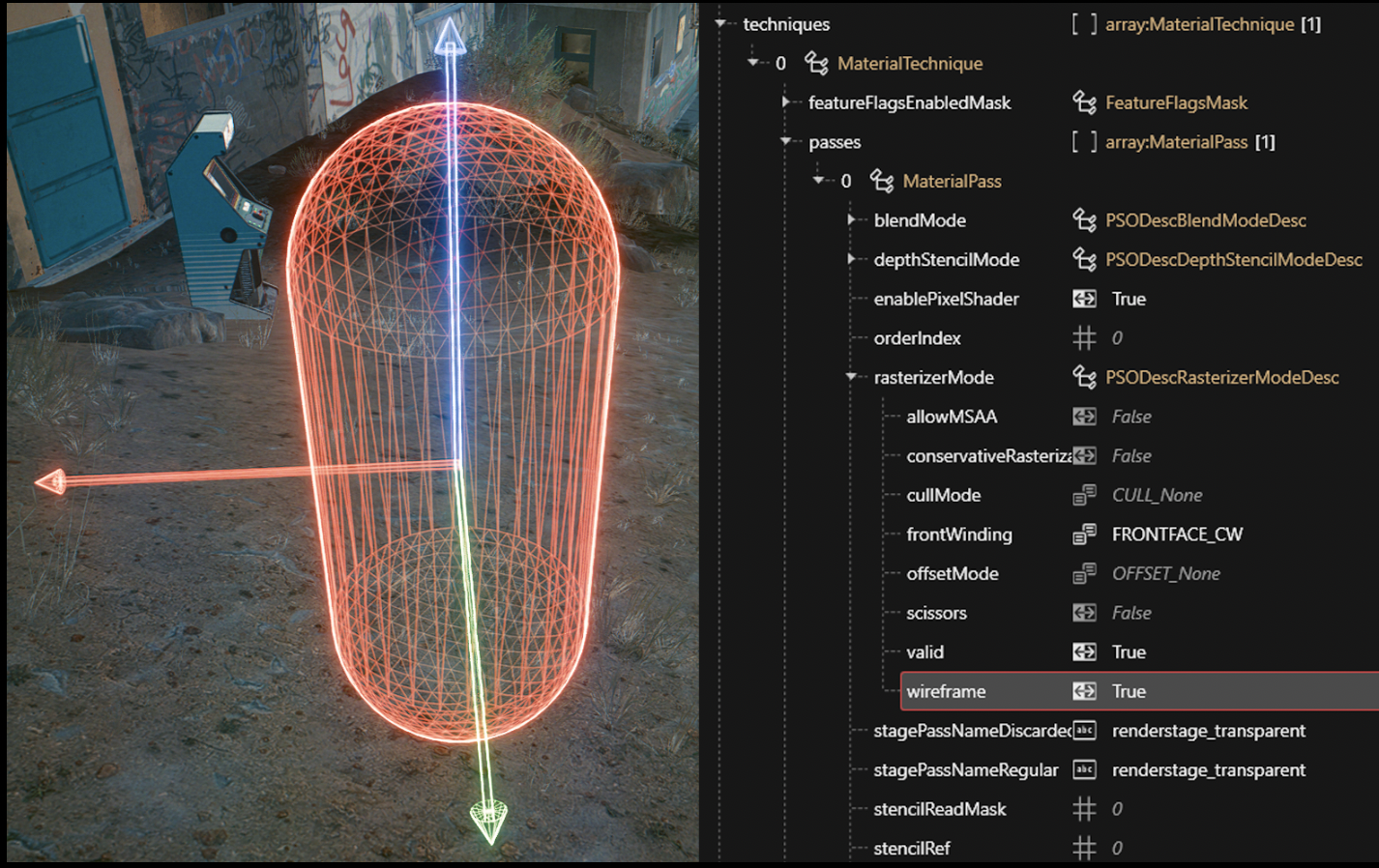
You can make materials display as wireframes of their geometry by changing the following property in their .mt.
{% hint style="danger" %}
Please do not overwrite original .mt files, as this will effect everything in the entire game. Always create your own local copy!
{% endhint %}