> For the complete documentation index, see [llms.txt](https://wiki.redmodding.org/scripting-cyberpunk/llms.txt). Markdown versions of documentation pages are available by appending `.md` to page URLs; this page is available as [Markdown](https://wiki.redmodding.org/scripting-cyberpunk/scripting/settings/mod-settings.md).
# Mod Settings
How to create settings for your Redscript mods
## Introduction
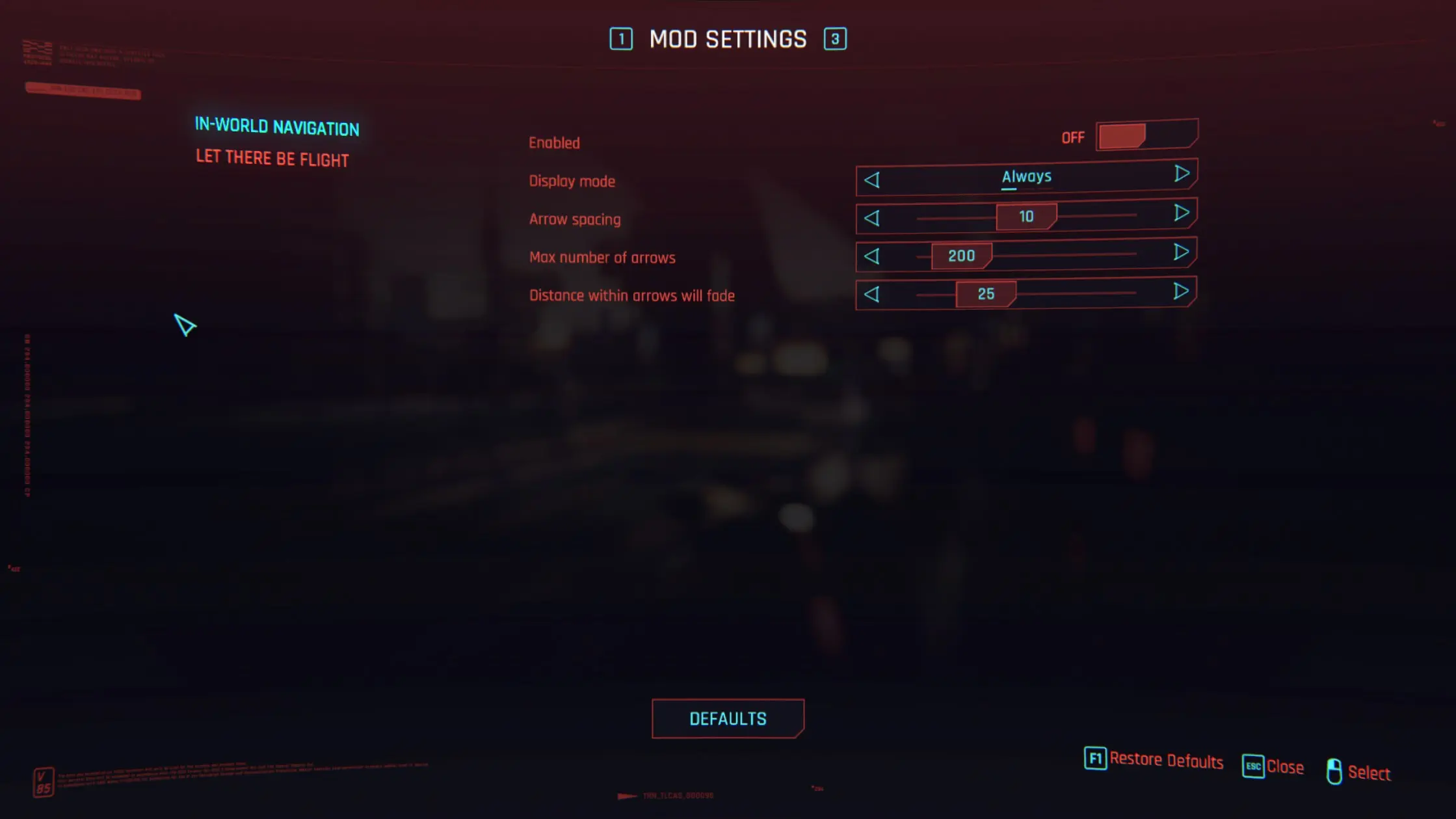
Mod Settings ([NexusMod](https://www.nexusmods.com/cyberpunk2077/mods/4885) | [GitHub](https://github.com/jackhumbert/mod_settings)) is a [RED4ext](https://docs.red4ext.com/) plugin for modders who which to configure settings of their mods, using native UI of the game. It is mostly intended for players to allow them to tweak some parameters with a straightforward UX.
Example from NexusMods
You can use it when coding with [redscript](/scripting-cyberpunk/redscript/what-is-redscript.md) to declare a class, bind properties with annotations and listen for changes when player accepts them. That's it, everything else is handled by Mod Settings for you regarding UI and inputs.
## Define a class
You can declare a new class which will hold the settings of your mod. You can choose to put all settings in the same class if you wish, even if you don't want to expose all of them.
It's recommended to register your class as a [singleton](https://wiki.redmodding.org/redscript/references-and-examples/scriptable-systems), which ensures that only one instance of your class exists. With singletons, at any point in your code (assuming that game systems are available), you're able to get a reference to it and use it as you wish; which is a good use-case for settings.
To create a singleton, all you need to do is to have your class extend [ScriptableSystem](https://nativedb.red4ext.com/c/5802799602997948).
Different Types of Singletons
If you have [Codeware](broken://pages/nNWvLgRljYGbCqk3ULcG) installed, you can also register a singleton by using `ScriptableService` instead.
The main differences between these two is that `ScriptableSystem`s are bounded to game sessions, they're only available when in a game session. `ScriptableService`s are independent of game sessions as they are created when the game starts, so they're always available.
In the context of settings, I would recommend `ScriptableService` as their use-case is perfect for settings.
Documentation:
* [More differences between ScriptableService and ScriptableSystem](https://wiki.redmodding.org/redscript/references-and-examples/scriptable-systems/scriptables-comparison)
* [`ScriptableService` documentation](https://github.com/psiberx/cp2077-codeware/wiki#lifecycle)
```swift
public enum MyStyle {
Rock = 0,
Electro = 1,
Jazz = 2,
Punk = 3,
Cyber = 4,
Reggae = 5
}
public class MySettings extends ScriptableSystem {
// Whether mod is enabled?
public let enabled: Bool;
// Some threshold between 0% an 100%.
public let threshold: Float;
// Some enum example.
public let style: MyStyle;
// We don't want to expose this.
public let secret: String;
// Called when a game session is created (also called for the main menu).
public func OnAttach() -> Void {
return;
}
// Called when a game session is closing (also called for the main menu).
public func OnDetach() -> Void {
return;
}
public final static func GetInstance(gameInstance: GameInstance) -> ref {
return GameInstance.GetScriptableSystemsContainer(gameInstance).Get(NameOf()) as MySettings;
}
}
```
## Binding properties
Mod Settings uses the annotation `@runtimeProperty(key: String, value: String)` to bind metadata to a property. Using key value pairs (metadata), we can give Mod Settings information about what we want to show in the UI and how.
{% hint style="info" %}
Whatever value you assign the property is treated as that property's default value.
{% endhint %}
{% hint style="info" %}
For any annotations where you provide a string for the value, you can instead opt for a localization key.
{% endhint %}
### Supported Types
These are the supported property types you can bind Mod Settings to, along with how they're shown in the UI.
* `Bool`: A toggle-able on/off switch.
* `Int32`: A slider with `Int32` values for the user to choose from.
* `Float`: A slider with `Float` values for the user to choose from.
* `Enum`: A selector to choose from the specified enum's values.
* `EInputKey`: A button where the user can input any key (supports both keyboard and controller).
### Base Annotations
The following annotations is supported for all property types.
* `@runtimeProperty("ModSettings.mod", "String")`: The unique name of your mod, this is how Mod Settings can differentiate settings for your mod from another mod. You **must** reuse the same value on other properties.
* `@runtimeProperty("ModSettings.displayName", "String")`: The label for this property to show to the player in the UI.
* `@runtimeProperty("ModSettings.description", "String")`: The hint for this property when the player hovers over the setting, which can be helpful if the label is not explicit for new players of your mod.
* `@runtimeProperty("ModSettings.category", "String")`: The category to list a property under, Mod Settings will group all properties with the same category with each other, under a separator with the category's name.
* `@runtimeProperty("ModSettings.category.order", "Number")`: The specific order placement for the category, use this if you want to manually specify how you want categories to be ordered in the UI.
* `@runtimeProperty("ModSettings.dependency", "String")`: Use this annotation on a property if you want to show it only if another Boolean setting is enabled, `String` must be the name of the Boolean setting property.
### Specific Annotations
The following annotations are only supported on properties with a specific type:
#### `Int32`
* `@runtimeProperty("ModSettings.min", "Int32")`: The minimum allowed amount for the slider.
* `@runtimeProperty("ModSettings.max", "Int32")`: The maximum allowed amount for the slider.
* `@runtimeProperty("ModSettings.step", "Int32")`: The amount to add/decrease when the user changes the amount.
#### **`Float`**
* `@runtimeProperty("ModSettings.min", "Float")`: The minimum allowed amount for the slider.
* `@runtimeProperty("ModSettings.max", "Float")`: The maximum allowed amount for the slider.
* `@runtimeProperty("ModSettings.step", "Float")`: The amount to add/decrease when the user changes the amount.
#### `Enum`
* `@runtimeProperty("ModSettings.displayValues.EnumValue", "String")`: When displaying enums to the user, by default, Mod Settings will simply use the enum's values as the label displayed. If wanted, you can provide this annotation to specify the label for each value.
## Listeners
In order to have the class' properties update during run-time when the player makes any changes (through the `Accept` button), you must register a listener to your class.
There are essentially two methods to tell Mod Settings you want to listen for changes:
### Listening to Changes
Binding annotations to your class' properties isn't enough, as you also must register a listener to the class in order to have Mod Settings update the properties during run-time, whenever the player makes changes.
```swift
public native class ModSettings {
public static func RegisterListenerToClass(target: ref);
public static func UnregisterListenerToClass(target: ref);
}
```
### Listening to Modifications
```swift
public native class ModSettings {
public static func RegisterListenerToModifications(target: ref);
public static func UnregisterListenerToModifications(target: ref);
}
```
If wanted, you can use the above methods on any class to make Mod Settings fire callbacks whenever a setting is changed in Mod Settings.
You must define any of the following methods to the class in order for Mod Settings to call it:
```swift
public cb func OnModVariableChangeRequested(groupPath: CName, varName: CName) -> Void { }
public cb func OnModVariableChangeAccepted(groupPath: CName, varName: CName) -> Void { }
public cb func OnModSettingsChange() -> Void { }
```
{% hint style="info" %}
`groupPath` is equal to `/mods/[ModName]/[ModClass]`, and `varName` is equal to the variable name.
{% endhint %}
{% hint style="info" %}
You must exactly name the callback methods as you see it, you must also not forget to use the keyword `cb` either. Both conditions are required for the method to be called by Mod Settings.
{% endhint %}
### Registering Listeners
We can update `MySettings` with `Listen` and `Unlisten` methods:
```swift
// ...
public class MySettings extends ScriptableSystem {
// ...
public func Listen() {
FTLog("MySettings.Listen");
ModSettings.RegisterListenerToClass(this);
ModSettings.RegisterListenerToModifications(this);
}
public func Unlisten() {
FTLog("MySettings.Unlisten");
ModSettings.UnregisterListenerToClass(this);
ModSettings.UnregisterListenerToModifications(this);
}
// Since we're registering this class to listen to modifications, we'll also need to
// declare the callback function for Mod Settings
//
// This will be called whenever the player changes settings by clicking the "Accept"
// button (for any mod)
public cb func OnModSettingsChange() {
FTLog(s"MySettings.enabled: \(this.enabled)");
}
// ...
}
```
Now you can call `Listen`/`Unlisten` whenever your singleton is registered/unregistered in their respective lifecycle methods. Using `MySettings` from above, here is how you can register it for `ScriptableSystem`s:
```swift
public class MySettings extends ScriptableSystem {
// ...
public func OnAttach() -> Void {
this.Listen();
}
public func OnDetach() -> Void {
this.Unlisten();
}
// ...
}
```
If you are using ScriptableService
Here's how it would look like instead:
```swift
public class MySettings extends ScriptableService {
// ...
protected cb func OnLoad() -> Void {
this.Listen();
}
protected cb func OnReload() -> Void {
this.Listen();
}
protected cb func OnUninitialize() -> Void {
this.Unlisten();
}
public func Listen() {
ModSettings.RegisterListenerToClass(this);
ModSettings.RegisterListenerToModifications(this);
}
public func Unlisten() {
ModSettings.UnregisterListenerToClass(this);
ModSettings.UnregisterListenerToModifications(this);
}
protected cb func OnModSettingsChange() -> Void {
FTLog(s"MySettings.enabled: \(this.enabled)");
}
// ...
}
```
{% hint style="warning" %}
If you are using [RedHotTools](https://github.com/psiberx/cp2077-red-hot-tools) to reload your scripts: you must call **`Listen`** in the **`Reload`** method of your `ScriptableService`. You don't need to **`Unlisten`** in such case.
{% endhint %}
## Save changes dynamically
You can provide players with another entry-point to change your settings. For example using a popup or a choice hub, without Mod Settings menu. As-is, changes made to a setting won't be saved by Mod Settings in its configuration file.
You can get the `ConfigVar` of your settings, and then apply changes to be saved (dynamically) like if it was done through Mod Settings menu:
```swift
public class MySettings extends ScriptableSystem {
// ...
public func Save() {
let configs = ModSettings.GetVars(n"MyMod", n""); // n"" => no explicit category
for config in configs {
if Equals(config.GetName(), n"enabled") { // locate the ConfigVar / variable
let enabled = config as ModConfigVarBool;
enabled.SetValue(this.enabled); // set the new value to be stored
ModSettings.AcceptChanges(); // save new value in configuration file
return;
}
}
}
// ...
}
```
## Full example
{% hint style="info" %}
If you're having trouble implementing Mod Settings for your mod, feel free to ask for help in [redscript-scripting](https://discord.com/channels/717692382849663036/804399334246187038) channel on Discord.
{% endhint %}
### Code
Here is a more in-depth example showcasing the various supported types and annotations:
```swift
public enum MyStyle {
Rock = 0,
Electro = 1,
Jazz = 2,
Punk = 3,
Cyber = 4,
Reggae = 5
}
public class MySettings extends ScriptableSystem {
@runtimeProperty("ModSettings.mod", "My Very Cool Mod")
@runtimeProperty("ModSettings.category", "Gameplay-RPG-Items-Categories-General")
@runtimeProperty("ModSettings.category.order", "1")
@runtimeProperty("ModSettings.displayName", "Gameplay-Devices-Interactions-Enable")
@runtimeProperty("ModSettings.description", "Whether this mod is enabled?")
public let enabled: Bool = true;
@runtimeProperty("ModSettings.mod", "My Very Cool Mod")
@runtimeProperty("ModSettings.category", "Gameplay-RPG-Items-Categories-General")
@runtimeProperty("ModSettings.category.order", "1")
@runtimeProperty("ModSettings.displayName", "Styles")
@runtimeProperty("ModSettings.description", "Your style.")
@runtimeProperty("ModSettings.displayValues.Rock", "Rock")
@runtimeProperty("ModSettings.displayValues.Electro", "Electro")
@runtimeProperty("ModSettings.displayValues.Jazz", "Jazz")
@runtimeProperty("ModSettings.displayValues.Punk", "Punk")
@runtimeProperty("ModSettings.displayValues.Cyber", "Cyber")
@runtimeProperty("ModSettings.displayValues.Reggae", "Reggae")
public let style: MyStyle = MyStyle.Punk;
@runtimeProperty("ModSettings.mod", "My Very Cool Mod")
@runtimeProperty("ModSettings.category", "Gameplay-RPG-Items-Categories-General")
@runtimeProperty("ModSettings.category.order", "1")
@runtimeProperty("ModSettings.displayName", "Second Style")
@runtimeProperty("ModSettings.description", "Your second style.")
@runtimeProperty("ModSettings.displayValues.Rock", "Rock")
@runtimeProperty("ModSettings.displayValues.Electro", "Electro")
@runtimeProperty("ModSettings.displayValues.Jazz", "Jazz")
@runtimeProperty("ModSettings.displayValues.Punk", "Punk")
@runtimeProperty("ModSettings.displayValues.Cyber", "Cyber")
@runtimeProperty("ModSettings.displayValues.Reggae", "Reggae")
@runtimeProperty("ModSettings.dependency", "enabled")
public let secondStyle: MyStyle = MyStyle.Cyber;
@runtimeProperty("ModSettings.mod", "My Very Cool Mod")
@runtimeProperty("ModSettings.category", "Numbers")
@runtimeProperty("ModSettings.category.order", "2")
@runtimeProperty("ModSettings.displayName", "Threshold")
@runtimeProperty("ModSettings.description", "A float")
@runtimeProperty("ModSettings.min", "0.0")
@runtimeProperty("ModSettings.max", "100.0")
@runtimeProperty("ModSettings.step", "0.1")
public let threshold: Float = 4.3;
@runtimeProperty("ModSettings.mod", "My Very Cool Mod")
@runtimeProperty("ModSettings.category", "Numbers")
@runtimeProperty("ModSettings.category.order", "2")
@runtimeProperty("ModSettings.displayName", "Int32")
@runtimeProperty("ModSettings.description", "A number")
@runtimeProperty("ModSettings.min", "-100")
@runtimeProperty("ModSettings.max", "100")
@runtimeProperty("ModSettings.step", "1")
public let int: Int32 = 50;
@runtimeProperty("ModSettings.mod", "My Very Cool Mod")
@runtimeProperty("ModSettings.category", "Hotkeys")
@runtimeProperty("ModSettings.category.order", "3")
@runtimeProperty("ModSettings.displayName", "Keyboard Hotkey")
@runtimeProperty("ModSettings.description", "keyboard hotkey")
public let keyboardHotkey: EInputKey = EInputKey.IK_L;
@runtimeProperty("ModSettings.mod", "My Very Cool Mod")
@runtimeProperty("ModSettings.category", "Hotkeys")
@runtimeProperty("ModSettings.category.order", "3")
@runtimeProperty("ModSettings.displayName", "Controller Hotkey")
@runtimeProperty("ModSettings.description", "controller hotkey")
public let controllerHotkey: EInputKey = EInputKey.IK_Pad_A_CROSS;
// This isn't shown in the UI as it has no annotations.
public let secret: String;
public func OnAttach() -> Void {
this.Listen();
}
public func OnDetach() -> Void {
this.Unlisten();
}
public func Listen() {
ModSettings.RegisterListenerToClass(this);
ModSettings.RegisterListenerToModifications(this);
}
public func Unlisten() {
ModSettings.UnregisterListenerToClass(this);
ModSettings.UnregisterListenerToModifications(this);
}
public cb func OnModSettingsChange() {
FTLog(s"MySettings.enabled: \(this.enabled)");
}
public final static func GetInstance(gameInstance: GameInstance) -> ref {
return GameInstance.GetScriptableSystemsContainer(gameInstance).Get(NameOf()) as MySettings;
}
}
```
If you are using ScriptableService instead
```swift
public enum MyStyle {
Rock = 0,
Electro = 1,
Jazz = 2,
Punk = 3,
Cyber = 4,
Reggae = 5
}
public class MySettings extends ScriptableService {
@runtimeProperty("ModSettings.mod", "My Very Cool Mod")
@runtimeProperty("ModSettings.category", "Gameplay-RPG-Items-Categories-General")
@runtimeProperty("ModSettings.category.order", "1")
@runtimeProperty("ModSettings.displayName", "Gameplay-Devices-Interactions-Enable")
@runtimeProperty("ModSettings.description", "Whether this mod is enabled?")
public let enabled: Bool = true;
@runtimeProperty("ModSettings.mod", "My Very Cool Mod")
@runtimeProperty("ModSettings.category", "Gameplay-RPG-Items-Categories-General")
@runtimeProperty("ModSettings.category.order", "1")
@runtimeProperty("ModSettings.displayName", "Styles")
@runtimeProperty("ModSettings.description", "Your style.")
@runtimeProperty("ModSettings.displayValues.Rock", "Rock")
@runtimeProperty("ModSettings.displayValues.Electro", "Electro")
@runtimeProperty("ModSettings.displayValues.Jazz", "Jazz")
@runtimeProperty("ModSettings.displayValues.Punk", "Punk")
@runtimeProperty("ModSettings.displayValues.Cyber", "Cyber")
@runtimeProperty("ModSettings.displayValues.Reggae", "Reggae")
public let style: MyStyle = MyStyle.Punk;
@runtimeProperty("ModSettings.mod", "My Very Cool Mod")
@runtimeProperty("ModSettings.category", "Gameplay-RPG-Items-Categories-General")
@runtimeProperty("ModSettings.category.order", "1")
@runtimeProperty("ModSettings.displayName", "Second Style")
@runtimeProperty("ModSettings.description", "Your second style.")
@runtimeProperty("ModSettings.displayValues.Rock", "Rock")
@runtimeProperty("ModSettings.displayValues.Electro", "Electro")
@runtimeProperty("ModSettings.displayValues.Jazz", "Jazz")
@runtimeProperty("ModSettings.displayValues.Punk", "Punk")
@runtimeProperty("ModSettings.displayValues.Cyber", "Cyber")
@runtimeProperty("ModSettings.displayValues.Reggae", "Reggae")
@runtimeProperty("ModSettings.dependency", "enabled")
public let secondStyle: MyStyle = MyStyle.Cyber;
@runtimeProperty("ModSettings.mod", "My Very Cool Mod")
@runtimeProperty("ModSettings.category", "Numbers")
@runtimeProperty("ModSettings.category.order", "2")
@runtimeProperty("ModSettings.displayName", "Threshold")
@runtimeProperty("ModSettings.description", "A float")
@runtimeProperty("ModSettings.min", "0.0")
@runtimeProperty("ModSettings.max", "100.0")
@runtimeProperty("ModSettings.step", "0.1")
public let threshold: Float = 4.3;
@runtimeProperty("ModSettings.mod", "My Very Cool Mod")
@runtimeProperty("ModSettings.category", "Numbers")
@runtimeProperty("ModSettings.category.order", "2")
@runtimeProperty("ModSettings.displayName", "Int32")
@runtimeProperty("ModSettings.description", "A number")
@runtimeProperty("ModSettings.min", "-100")
@runtimeProperty("ModSettings.max", "100")
@runtimeProperty("ModSettings.step", "1")
public let int: Int32 = 50;
@runtimeProperty("ModSettings.mod", "My Very Cool Mod")
@runtimeProperty("ModSettings.category", "Hotkeys")
@runtimeProperty("ModSettings.category.order", "3")
@runtimeProperty("ModSettings.displayName", "Keyboard Hotkey")
@runtimeProperty("ModSettings.description", "keyboard hotkey")
public let keyboardHotkey: EInputKey = EInputKey.IK_L;
@runtimeProperty("ModSettings.mod", "My Very Cool Mod")
@runtimeProperty("ModSettings.category", "Hotkeys")
@runtimeProperty("ModSettings.category.order", "3")
@runtimeProperty("ModSettings.displayName", "Controller Hotkey")
@runtimeProperty("ModSettings.description", "controller hotkey")
public let controllerHotkey: EInputKey = EInputKey.IK_Pad_A_CROSS;
// This isn't shown in the UI as it has no annotations.
public let secret: String;
protected cb func OnLoad() -> Void {
this.Listen();
}
protected cb func OnReload() -> Void {
this.Listen();
}
protected cb func OnUninitialize() -> Void {
this.Unlisten();
}
public func Listen() {
ModSettings.RegisterListenerToClass(this);
ModSettings.RegisterListenerToModifications(this);
}
public func Unlisten() {
ModSettings.UnregisterListenerToClass(this);
ModSettings.UnregisterListenerToModifications(this);
}
public cb func OnModSettingsChange() {
FTLog(s"MySettings.enabled: \(this.enabled)");
}
public final static func GetInstance() -> ref {
return GameInstance.GetScriptableServiceContainer().GetService(NameOf()) as MySettings;
}
}
```
### Preview
{% hint style="info" %}
Things to note:
* Note how the label for the "General" category was defined as `Gameplay-RPG-Items-Categories-General`, as Mod Settings supports localization keys for any string values.
* You don't see the `secondStyle` setting in the UI at all, that's because it is dependent on the `enabled` property and won't show if `enabled` is false (i.e. it won't show if the mod is disabled).
* The `secret` property of the class isn't known to Mod Settings at all because it has no annotations.
{% endhint %}
### Practical Example
As an example, if you want to give the player X amount of money (where X equals to the `threshold` setting) whenever they jump, here's how you can do it:
```swift
@wrapMethod(PlayerPuppet)
protected cb func OnAction(action: ListenerAction, consumer: ListenerActionConsumer) -> Bool {
let settings: ref = MySettings.GetInstance(this.GetGame());
if IsDefined(settings) && settings.enabled {
if action.IsAction(n"Jump") && action.IsButtonJustReleased() {
let transactionSystem: ref = GameInstance.GetTransactionSystem(this.GetGame());
transactionSystem.GiveItemByTDBID(this, t"Items.money", RoundF(settings.threshold));
}
}
return wrappedMethod(action, consumer);
}
```
You can also save a reference to `MySettings` instead of getting it every time you want to access it. You can add it as a field to `PlayerPuppet` (or the object you want to use it in) and get/remove the reference when the object is initialized and uninitialized.
For example:
{% hint style="warning" %}
If you're adding a field to an existing object, make sure that the property's name is unique. Adding some sort of initial of your mod's name is a good practice.
{% endhint %}
```swift
// mvcm -> My Very Cool Mod
@addField(PlayerPuppet)
protected let m_mvcmSettings: wref;
@wrapMethod(PlayerPuppet)
protected cb func OnGameAttached() -> Bool {
wrappedMethod();
this.m_mvcmSettings = MySettings.GetInstance(this.GetGame());
}
@wrapMethod(PlayerPuppet)
protected cb func OnDetach() -> Bool {
this.m_mvcmSettings = null;
wrappedMethod();
}
@wrapMethod(PlayerPuppet)
protected cb func OnAction(action: ListenerAction, consumer: ListenerActionConsumer) -> Bool {
if IsDefined(this.m_mvcmSettings) && this.m_mvcmSettings.enabled {
if action.IsAction(n"Jump") && action.IsButtonJustReleased() {
let transactionSystem: ref = GameInstance.GetTransactionSystem(this.GetGame());
transactionSystem.GiveItemByTDBID(this, t"Items.money", RoundF(this.m_mvcmSettings.threshold));
}
}
return wrappedMethod(action, consumer);
}
```