By default, all textures in Cyberpunk2077 are Y-flipped (upside down). WolvenKit will take care of that for you during import/export via the VFlip property.
If you just want to know how to import/export textures, see here.
Types of files
Diffuse/Albedo
This texture is directly projected onto a mesh to give it colour and appearance. Used by shaders like metal_base.remt.
Naming convention:
In the game files, these files will be named <name>_d.xbm (e.g. base\environment\decoration\food\packaged_food\textures\synthetic_snack_01_d.xbm)
When importing a diffuse texture with a non-default file name, make sure to check the isGamma box in the import properties.
Normal
Also known as "bump map", this texture is used to give a mesh depth and surface details. Used by shaders like metal_base.remt.
Naming convention:
In the game files, these files will be named <name>_n.xbm (e.g. base\environment\decoration\food\packaged_food\textures\synthetic_snack_01_n.xbm)
For a guide how to make your own normal maps, see here.
Roughness
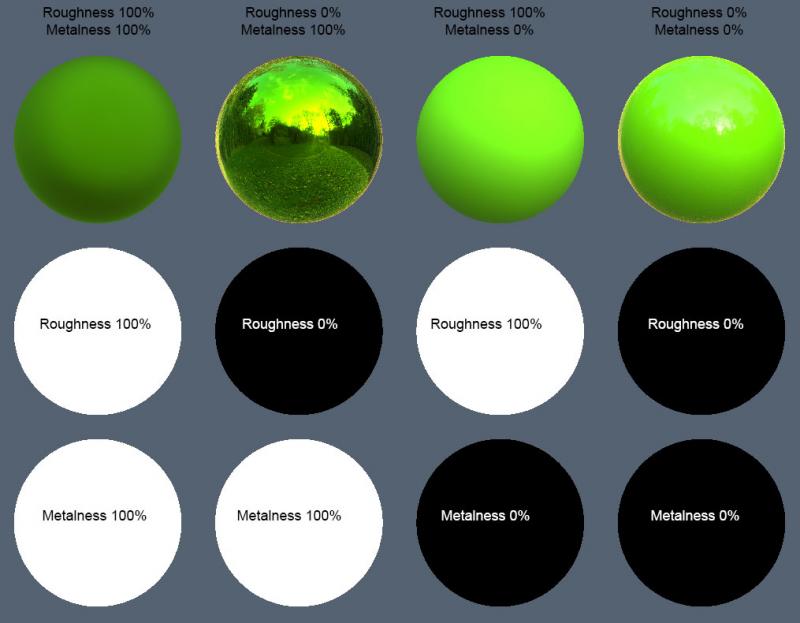
Also known as "gloss map", this texture defines how light scatters across the surface of your 3d model. Used by shaders like metal_base.remt.
In the game files, these files will be named <name>_n.xbm (e.g. base\environment\decoration\food\packaged_food\textures\synthetic_snack_01_r.xbm)
Metalness
Also known as "metallic map", this texture defines which parts of the material behave like metal and which parts don't. Used by shaders like metal_base.remt.