# WolvenKit

## Summary: What is Wolvenkit?

Originally released as W3Edit by [Sarcen](https://forums.cdprojektred.com/index.php?members/sarcen.3823905/), WolvenKit is the open-source (GPLv3) windows/Linux GUI editor that is the workhorse for beginner and advanced modders. It supports any game using redENGINE (v3 or v4).&#x20;

As of 2026, that means **Cyberpunk 2077** and **The Witcher 3: Wild Hunt**.&#x20;

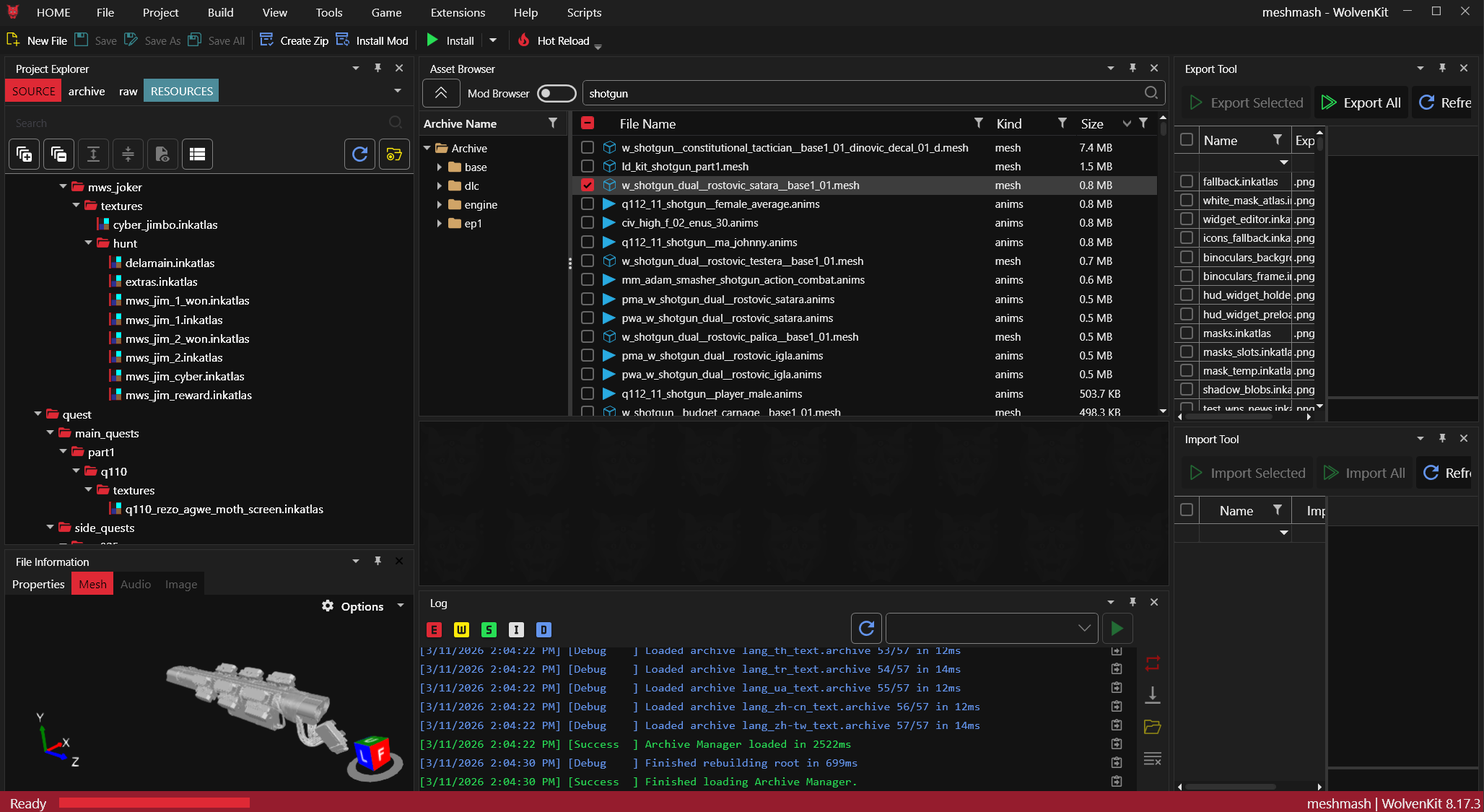
<figure><img src="https://1427525421-files.gitbook.io/~/files/v0/b/gitbook-x-prod.appspot.com/o/spaces%2F4gzcGtLrr90pVjAWVdTc%2Fuploads%2FVtrfFHg3jmlT0SBni2Qb%2Fimage.png?alt=media&#x26;token=299bc655-d124-4e61-bf8c-8b332f8d0b1a" alt="WolvenKit Screenshot March 2026"><figcaption><p>WolvenKit Screenshot, March 2026</p></figcaption></figure>

### Wait, this is not what I want!

WolvenKit has its own wiki in our space, you can get there by clicking on the link below:

{% embed url="<https://wiki.redmodding.org/wolvenkit/readme>" %}

It contains useful info, such as &#x20;

* The[Getting Started](https://app.gitbook.com/s/-MP_ozZVx2gRZUPXkd4r/getting-started "mention")guide and an "Explain it like I'm 5" walkthrough on how to install it
* Documentation explaining [Wolvenkit's Interface](https://app.gitbook.com/s/-MP_ozZVx2gRZUPXkd4r/wolvenkit-app/editor "mention")
* A list of [known Linux issues and their workarounds](https://app.gitbook.com/s/-MP_ozZVx2gRZUPXkd4r/getting-started/download#known-linux-issues-see-bug-reports-for-reporting)

## Download and Install

{% hint style="info" %}
You can find a more detailed walkthrough on the WKit wiki:[Full install walkthrough (ELI5)](https://app.gitbook.com/s/-MP_ozZVx2gRZUPXkd4r/getting-started/eli5-getting-started "mention")
{% endhint %}

To get started with WolvenKit, you will need to [download](https://wiki.redmodding.org/wolvenkit/getting-started/download) the standalone application. Extract it to a folder on your harddrive (NOT [the-cyberpunk-2077-game-directory](https://wiki.redmodding.org/cyberpunk-2077-modding/for-mod-users/users-modding-cyberpunk-2077/the-cyberpunk-2077-game-directory "mention")), for example `C:\CyberpunkModding\WolvenKit`, and start it by double-clicking the .exe file.

<table><thead><tr><th width="128.4000244140625">Version</th><th width="164.4000244140625">Download link</th><th>Version</th></tr></thead><tbody><tr><td>Stable</td><td><a href="https://github.com/WolvenKit/WolvenKit/releases">GitHub</a> | <a href="https://www.nexusmods.com/cyberpunk2077/mods/2201">Nexus</a> | <a data-footnote-ref href="#user-content-fn-1">?</a></td><td>8.17.3 (Mar 2026)</td></tr><tr><td>Nightly</td><td><a href="https://github.com/WolvenKit/WolvenKit-nightly-releases/releases">GitHub</a></td><td>8.17.4 (Mar 2026) | <a data-footnote-ref href="#user-content-fn-2">What's a Nightly?</a></td></tr></tbody></table>

## What can WolvenKit do for you?

{% hint style="info" %}
To make any persistent changes, you need to work inside [WolvenKit Projects](https://app.gitbook.com/s/-MP_ozZVx2gRZUPXkd4r/wolvenkit-app/usage/wolvenkit-projects "mention"). Without one, you can still browse through game files, but changes won't be persistent.
{% endhint %}

<table><thead><tr><th width="194"></th><th></th></tr></thead><tbody><tr><td>Asset Management</td><td>In the <a data-mention href="https://app.gitbook.com/s/-MP_ozZVx2gRZUPXkd4r/wolvenkit-app/editor/asset-browser">Asset Browser</a>, you can look through all files in the game — no extra steps needed.<br>By toggling the Mod Browser button, you can see modded intead of base game files.</td></tr><tr><td>Mod Packing</td><td>With just the <a href="https://app.gitbook.com/s/-MP_ozZVx2gRZUPXkd4r/wolvenkit-app/menu#install-and-launch-game">push of a toolbar button</a>, you can load your mod directly into your game (<a href="redhottools/rht-hot-reload">even while it's running</a>), or pack it for upload on Nexus. </td></tr><tr><td>File Editing</td><td>The built-in <a data-mention href="https://app.gitbook.com/s/-MP_ozZVx2gRZUPXkd4r/wolvenkit-app/editor/file-editor">File Editor</a> lets you edit any REDengine4 files, including in-place buffer data.</td></tr><tr><td>Import/Export</td><td>Easy <a data-mention href="https://app.gitbook.com/s/-MP_ozZVx2gRZUPXkd4r/wolvenkit-app/usage/import-export">Import/Export</a> of REDEngine4 files (for example: <code>.xbm</code> =><code>.png</code>, <code>.mesh</code> => <code>.glb</code>) for editing in external software like <a href="wolvenkit-blender-io-suite">Blender</a>.</td></tr><tr><td>World Editing</td><td>Wolvenkit is well-integrated with the <a data-mention href="../../modding-guides/world-editing">world-editing</a>toolchain - you can convert your temporary world edit to just another part of Night City.</td></tr><tr><td>Quest Editing</td><td>Our quest editor is not as comfortable as CDPR's (we hope!!!), but you can <a href="../../modding-guides/quest">create your own quests</a>.</td></tr></tbody></table>

[^1]:

[^2]: We want our releases to be stable and bug-free - however, we also want to release more features and make WKit a better software. That's where the Nightly comes in: a new artifact is created every time there is new stuff. If you report bugs (via github), we'll fix them as soon as we can!
