githubEdit

Entity: .ent files

All the dirty detes on entity files

Definition

Serves as the top-level container for entities and their properties within the game. Most things that you can see, touch, or interact with have an .ent file somewhere in their hierarchy. Examples are player equipment, weapons, NPCs, interactables (doors, vending machines…)

For the purpose of modding, we distinguish between two different kinds of entity files.

circle-info

To see a minimal example in action, see the guide for creating custom props.

Mesh/Component entity (simple entity)

The minimal way of adding something (e.g. meshes) to the game. This entity can be directly spawned (e.g. via AMM) or referenced from within arrow-up-righthttps://github.com/CDPR-Modding-Documentation/Cyberpunk-Modding-Docs/blob/main/for-mod-creators-theory/files-and-what-they-do/file-formats/appearance-.app-files.

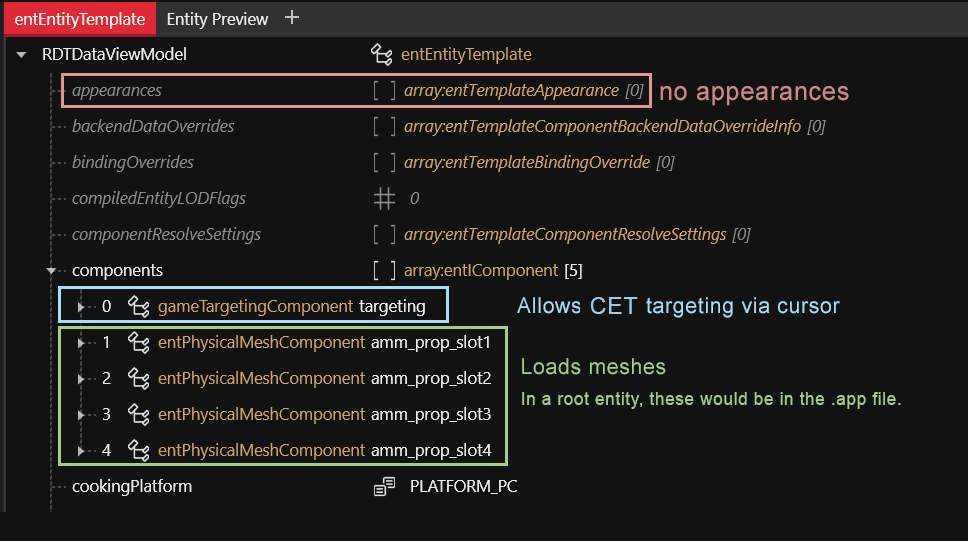
This entity adds four physical mesh components, which will appear when it is spawned. It does not reference an .app file and does not have appearances.
For player equipment (weapons and armour), you can use mesh entities to encapsulate parts of your item. You load such .ent files via partsValues, which will be added to the corresponding appearance as if the components had been in the .app file itself.

triangle-exclamation

This is good practice to avoid repetition, and also to make it easy on yourself if you want to change paths later in your project (imagine having defined 20 appearances with 5 components each, and then wanting to rename your mesh folder…)

Root entity

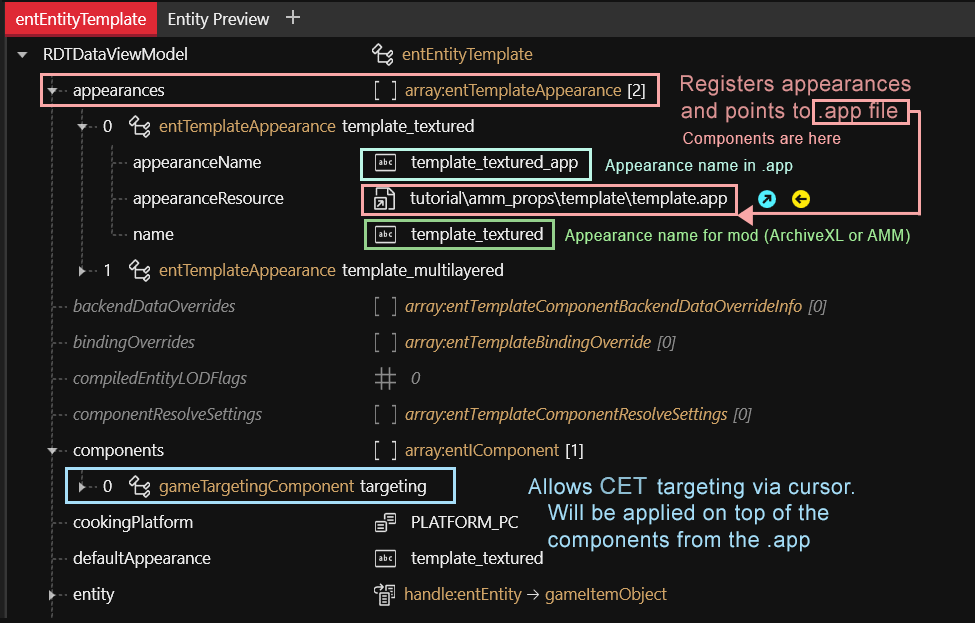
The entry point for the game to display an NPC or prop. This kind of entity only defines those components that are shared among all appearances. Meshes are defined in the app filearrow-up-right, where they can be assigned different properties (e.g. materials) per appearance.

circle-exclamation

From ArchiveXL item additions, this kind of file is usually called a root entity.

  • An entity file can define multiple appearances, which can point to different .app files.

  • For creating props, root entities are used as the defining key (one entity => one item, which can have multiple appearances)

  • Names support suffixes, allowing you to load different appearances based on body gender or camera mode. These are only used for player equipment and look like &FPP

  • How you split your .app files is largely a matter of taste. At CDPR, they usually shove everything into one file.

What are suffixes?

circle-info

For more information on this (and for a better way of implementing this), check ArchiveXL: Suffixes and Substitutions

In a root_entity file, you can give the game a list of appearances and have them mapped to an https://github.com/CDPR-Modding-Documentation/Cyberpunk-Modding-Docs/blob/main/for-mod-creators-theory/files-and-what-they-do/file-formats/appearance-.app-files by entry name. While that's pretty good already, have you ever wanted to be more specific — for example, "for a male character, use this appearance, but for a female use this other one?"

This is where suffixes come in. You append them to an appearance's name in the root_entity, and the game will pick the correct appearance (and the correct app filearrow-up-right, and the correct mesh!) based on the best match.

circle-check

If you are registering an item via ArchiveXL, you can define suffixes via appearanceSuffixes: [ … ] in the .yaml file.

circle-info

Your item will inherit the suffix setup from the $base component. In the example of Items.GenericHeadClothing, that will be

What can possibly go wrong?

circle-exclamation

Which suffixes exist?

circle-info

For a full list, check Which suffixes exist?

Last updated