> For the complete documentation index, see [llms.txt](https://wiki.redmodding.org/cyberpunk-2077-modding/llms.txt). Markdown versions of documentation pages are available by appending `.md` to page URLs; this page is available as [Markdown](https://wiki.redmodding.org/cyberpunk-2077-modding/the-wiki.md).
# The Wiki
How to contribute to the thing you're currently reading (please do)!
## Summary
**Published**: Feb 11 2024 by [mana vortex](mailto:undefined)\
**Last documented update**: Nov 10 2024 by [mana vortex](mailto:undefined)
This page gives you some intel on how the wiki works and why you should start contributing.
To skip the pep talk, you can jump directly to [#how-to-edit](#how-to-edit "mention") or [**sign up here**](https://app.gitbook.com/invite/-MP5ijqI11FeeX7c8-N8/IZreyNnVlImKaeMtoJLY) (github/Google account required)
## Why you should edit the wiki
{% hint style="info" %}
If you're already convinced, you can skip straight ahead to [#how-to-edit](#how-to-edit "mention") or [#requesting-reviews](#requesting-reviews "mention")
{% endhint %}
Wikis are the most open source thing since the invention of democracy, because everyone can edit them (that includes you!). They gather and share knowledge, facilitating all kinds of beautiful change — like the library of Alexandria before it was DDOSed by fire.
In terms of our wiki, that means:
* **Everyone** can learn how to make mods for Cyberpunk 2077\
\&#xNAN;*You don't know shit about Netrunning? Doesn't matter,* [*here's how you can make a t-shirt*](/cyberpunk-2077-modding/modding-guides/items-equipment/adding-new-items.md)*!*
* We don't have to research stuff all over\
[*Here's what we have about glowing materials*](/cyberpunk-2077-modding/for-mod-creators-theory/materials/configuring-materials/emissive-material-properties.md)*. Want more than that? Here's where you can start digging...*
* You can easily find people who can help you\
\&#xNAN;*Published: Feb 11 2024 by* [mana vortex](mailto:undefined)\
\&#xNAN;*If you make any progress on this, please contact* [mana vortex](mailto:undefined) *on Discord*
**Unfortunately, most people don't edit the wiki.**
Of course there are plenty of good reasons, so let's go over them one by one (open the box)
{% hint style="success" %}
You will never be bullied for sharing knowledge or skills on this wiki. If you ever feel as if you are, please get in touch with the mods on the [Wolvenkit Discord](http://discord.gg/redmodding), and we'll clear up the misunderstanding — because communication is hard and everyone here has the same goals.
{% endhint %}
Reasons Not To Edit The Wiki
**But I don't know how!**
That's easy, just scroll down to [#how-to-edit](#how-to-edit "mention") and find out!
**But I'll just ruin everything!**
No, you won't. Every change you make has to be reviewed by one of our **wiki admins** before going live, so you really couldn't if you tried.
**But my English is bad!**
I promise you, nobody else will care about this as much as you do. Personally, I'm so happy about the guide/wiki page's existence that I love the author all the more for not letting grammar get in the way.
That being said, if you really feel uncomfortable publishing anything in "bad English", we can solve that! You can either add it to the [title of your change request](#change-request-titles) (e.g. "`PLEASE FIX GRAMMAR my guide about stuff`"), or run your text through ChatGPT (this is exactly what LLMs are for!)
**But this is just speculation! I haven't verified it!**
No problem at all, just pop an info box at the top of your wiki page or section:
This stuff is **not verified**! If you can confirm it (or find out how it really works), please update this page or get in touch with (you) via (however)!
... and then go ahead. Remember, wikis are collaborative! Once you've put a foundation, others can pitch in and improve.
**But I have only half-understood this!**
Imagine the following situation:
In a world without wikis, you want to edit the colour of a car. After a bracing journey, you make it to the Discord server, where you find the `textures-and-materials` channel and ask. Someone cheerfully tells you:
Cyberpunk doesn't use textured materials, so you'll have to edit a multilayered file. For that, you're gonna want MLSetupBuilder, it's linked all over the place, there's also a channel somewhere under tools, or was it a thread? I dunno!
\
Ah, nvm. Just use the search function, you'll find people talking about this!
\
That is why even a shitty wiki page is better than none. At the very least, it's a point to collect information and links.
Besides, from personal experience — writing guides helps me to understand a process much better.
**But I'm just me! Why can't someone competent write this?**
There are two kinds of people: those who can write documentation and those who don't. A lot of people simply *suck* at explaining things (I'm sure you had at least one of those as a teacher), which rules them out for creating wiki guides.
That leaves a much smaller group, which again splits in two halves: those who hate writing documentation, and those who don't.
So you're looking for a competent person who is good at explaining things and doesn't hate making guides. That's not very many people, and most of them have other things to do besides writing wiki pages (making mods, developing tools, slaving away for a corporation to earn a living wage, you name it). Sure, if you wait long enough, someone will probably get around to it, but... chances are that it's someone just like you.
**OK, I'm sold! I'll edit as soon as...**
With all due respect, DO IT NOW!
Because "as soon as" never comes.
You'll be killed by a dropping anvil. Or you will be replaced by bodystealers from the dark side of the moon, who never intended to edit. Or while double-checking your facts, you'll notice another rabbit hole that you want to go down first. Or you'll forget about it. Or real life will get in the way.
Get that information out of your head and into a change request. If you never finish up on it, somebody else will — but at least your knowledge doesn't die with you.
Good luck, soldier!
***
## How to edit
Before you can edit, you need to [sign up to Gitbook](https://app.gitbook.com/invite/-MP5ijqI11FeeX7c8-N8/IZreyNnVlImKaeMtoJLY) (no way around it). It's integrated with github, so you can use that or your google log-in.
As of today (March 2024), I've never received a single spam mail from them.
### Change requests
You can't edit without a **change request** (which is a snapshot of the wiki as-it-is that you can fuck around with to your heart's content).
Until you complete the steps under [#requesting-reviews](#requesting-reviews "mention") and a wiki admin merges your changes, nothing of what you do will go live, so you can safely break everything.
{% hint style="info" %}
Please **name** your change request immediately - it helps to keep track of what's what, and also makes it easier to delete obsolete change requests.
{% endhint %}
Your edits will be **saved** in your change request, so that you (or somebody else) can resume editing later. See
#### Creating a new change request
{% hint style="warning" %}
When creating a new change request, please give it a title **immediately** (see the screenshot under [#browsing-existing-change-requests](#browsing-existing-change-requests "mention") as for why)
{% endhint %}
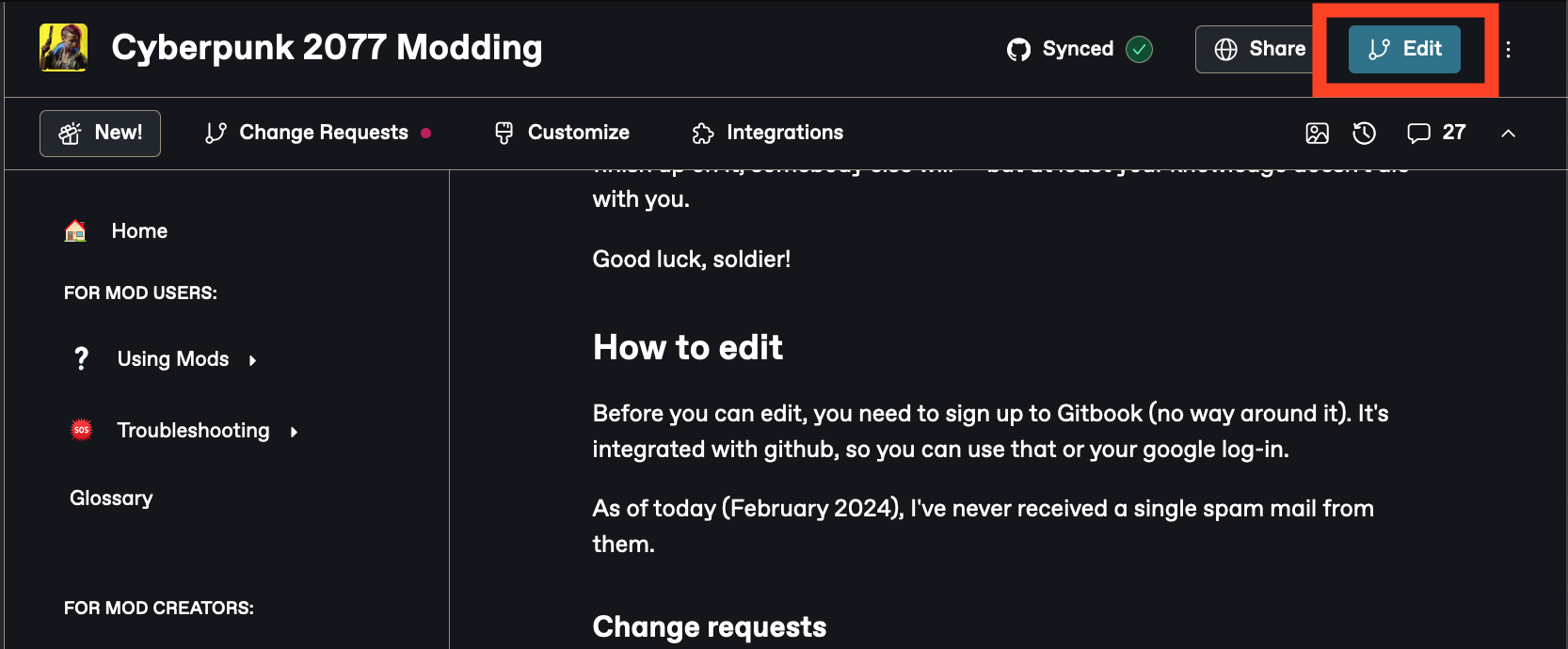
You can create one by clicking the Edit button in the upper right corner:
If you want to know more, you can check [gitbook's official documentation](https://docs.gitbook.com/content-editor/editor/change-requests) for this, or read the TL;DR below:
#### Browsing existing change requests
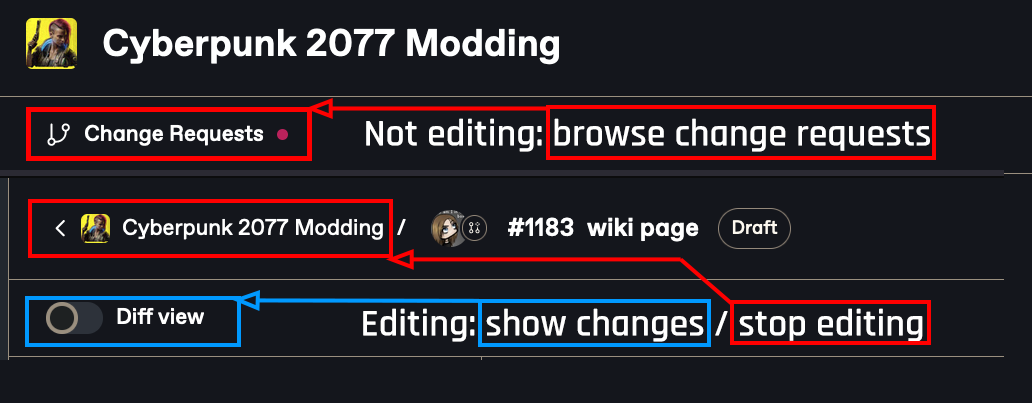
In the top left of your
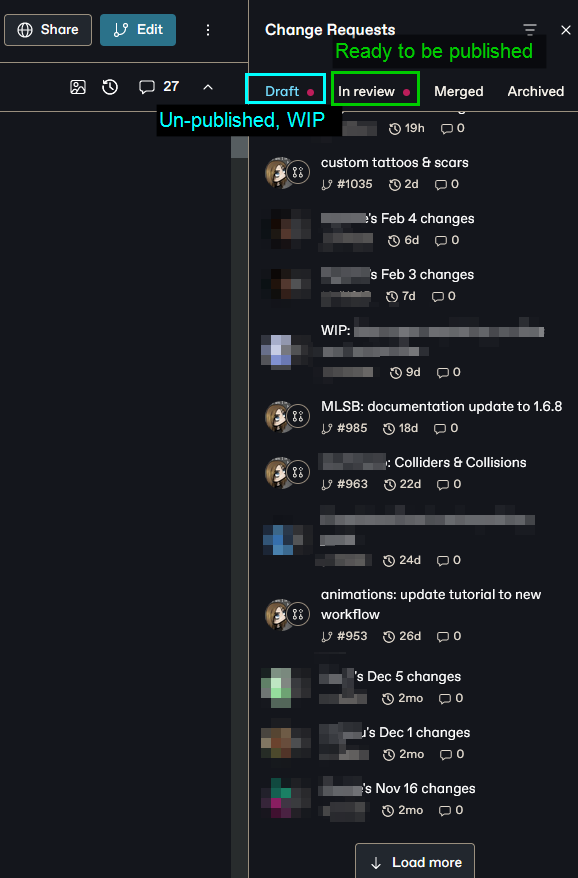
Clicking on "Change Requests" to the left opens a side bar panel where you can browse existing change requests:
Who created a change request doesn't matter much - everyone can edit them
#### Creating new change requests
Click the "Edit" button to create a new change request:
### Uploading files
You can upload images by either **pasting them**, or drag-and-dropping them into the article. Please make sure to
### Requesting reviews
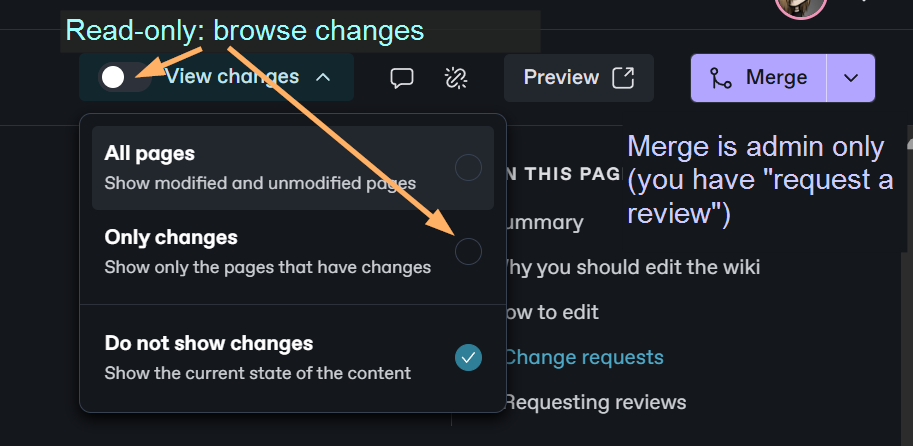
When you're done editing, you can request a review. The button is on the topright where the Edit button used to be:
... and that's it. After requesting a review, you don't have to do anything — your MR either gets merged directly, or the reviewer may change some things around (usually scatter some links), or they'll get back on you to clear things up.
## Editing guidelines
Please check the [#editing-guidelines](#editing-guidelines "mention") page for a few basics on wiki editing!
---
# Agent Instructions
This documentation is published with GitBook. GitBook is the documentation platform designed so that both humans and AI agents can read, navigate, and reason over technical content effectively. Learn more at gitbook.com.
## Querying This Documentation
If you need additional information that is not directly available in this page, you can query the documentation by asking a question.
Perform an HTTP GET request on the following URL with the `ask` and `goal` query parameters:
```
GET https://wiki.redmodding.org/cyberpunk-2077-modding/the-wiki.md?ask=&goal=
```
`ask` is the immediate question: it should be specific, self-contained, and written in natural language.
`goal` is what the user is ultimately trying to achieve, the reason they need the answer. Sharing it helps GitBook give you a better, more relevant answer. A goal is most helpful when it describes the outcome the user wants rather than restating the question. For example, with `ask=how do I create an API token`, a goal like `automate deployments from our CI pipeline` lets GitBook tailor the answer to that use case.
The response will contain a direct answer to the question and relevant excerpts and sources from the documentation.
Use this mechanism when the answer is not explicitly present in the current page, you need clarification or additional context, or you want to retrieve related documentation sections.