> For the complete documentation index, see [llms.txt](https://wiki.redmodding.org/cyberpunk-2077-modding/llms.txt). Markdown versions of documentation pages are available by appending `.md` to page URLs; this page is available as [Markdown](https://wiki.redmodding.org/cyberpunk-2077-modding/for-mod-creators-theory/references-lists-and-overviews/scripting/scripting-best-practices-pitfalls.md).
# Best practices / pitfalls
A collection of code-related knowledge
## LUA
### Gain performance: Early Return
You're probably used to coding like this:
local function myMethod()
  if condition then
    -- do a little dance, make a little love…
  end
end
In LUA, you can save a few processing cycles by using the early return style:
local function myMethod()
  if not condition then return end
  -- do a little dance, make a little love…
end
You can gain a **significant** amount of performance this way, especially where loops are concerned.
### Fixing/preventing nil access
LUA throws an exception if it encounters `nil` in unexpected places. The corresponding error will look like this:
attempt to access local '<variable name>' (a nil value)
stack traceback:
  my_example.lua:1234 in function 'MyFunctionName'
Open the corresponding file, find the correct line, and check what is being accessed there. It will look like `variable.property`, or perhaps something will be concatenated to a string (`"something something text" .. variable`).
You can assign a **default value** to the property in question:
```lua
local myString = my_potentially_unset_string or ""
local myNumber = my_potentially_unset_number or 0
local myObject = my_potentially_unset_object or {}
```
{% hint style="info" %}
While that won't solve any other problems, it will at least make the error go away.
{% endhint %}
### Switch in LUA: Lookup Tables
Who doesn't know the problem? You want to know if your string is A, B, or C, but not D — and LUA doesn't have a switch statement.
Fortunately, there is a built-in and performant way to do that:
```lua
myTable = {
A = true,
B = true,
C = true
}
myTable.A # true
myTable.B # true
myTable.C # true
myTable.D # nil => false
myTable.WHATEVER # nil => false
```
### Performance killers: strings
String concatenation and comparison can be the difference between a brief stutter and a complete freeze or even crash to desktop. This is not a joke — see [here](https://www.lua.org/gems/sample.pdf) for more detail.
#### Comparing/Searching
Lua internalizes strings. That means these two strings will share a single representation in memory:
```lua
local string1 = "This is the same object!"
local string2 = "This is the same object!"
```
The comparison between those two strings will be almost-instant.
This becomes a problem when comparing strings in a loop (see [Scopes](#scopes)):
```lua
for (_, mystring) in ipairs(mytable) do
if mystring == "This is the same object!" then
-- do something
end
end
```
Every single pass of the loop will create a memory representation of "This is the same object!" and then discard it again.
local myCompareString = "This is the same object!"
for (_, mystring) in ipairs(mytable) do
    if mystring == myCompareString then
        -- do something
    end
end
{% hint style="success" %}
Takeaway:
If at all possible, define things outside the scope of loops!
{% endhint %}
#### Search in strings
{% hint style="success" %}
TL;DR:
* Avoid regex and patterns if possible
* prefer `String.find()` over `String.match()`
{% endhint %}
Lua's regex implementation is very limited, even more so for the pipe `|` character. For example, the following example will **actually iterate twice** after creating internal string representations:
```lua
if string.find("catastrophe", "dog|cat") then
-- do something
end
```
It is faster to just do this:
```lua
if string.find("catastrophe", "dog") or string.find("catastrophe", "cat") then
-- do something
end
```
**Bad**
On top of that, `string.match` will return the entire string if no match is found:
```lua
local match = string.match("catastrophe", "dog")
if match ~= "catastrophe" then
-- do something
end
```
**Good**:
The alternative:
```lua
if string.find("catastrophe", "dog")
-- do something
end
```
#### Concatenation
{% hint style="info" %}
For a performance analysis of different kinds of string concatenation, check [here](https://dannyguo.medium.com/how-to-concatenate-strings-in-lua-d2164cc5922f).
{% endhint %}
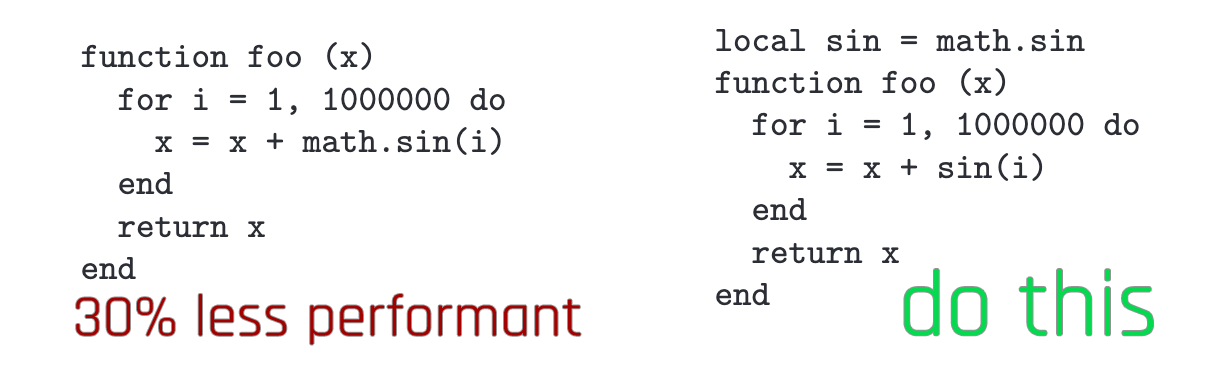
### Scopes
It is cheaper to access local variables than to access nested scopes:
(If you overdo this, your code will become unreadable. Use responsibly.)
---
# Agent Instructions
This documentation is published with GitBook. GitBook is the documentation platform designed so that both humans and AI agents can read, navigate, and reason over technical content effectively. Learn more at gitbook.com.
## Querying This Documentation
If you need additional information that is not directly available in this page, you can query the documentation by asking a question.
Perform an HTTP GET request on the following URL with the `ask` and `goal` query parameters:
```
GET https://wiki.redmodding.org/cyberpunk-2077-modding/for-mod-creators-theory/references-lists-and-overviews/scripting/scripting-best-practices-pitfalls.md?ask=&goal=
```
`ask` is the immediate question: it should be specific, self-contained, and written in natural language.
`goal` is what the user is ultimately trying to achieve, the reason they need the answer. Sharing it helps GitBook give you a better, more relevant answer. A goal is most helpful when it describes the outcome the user wants rather than restating the question. For example, with `ask=how do I create an API token`, a goal like `automate deployments from our CI pipeline` lets GitBook tailor the answer to that use case.
The response will contain a direct answer to the question and relevant excerpts and sources from the documentation.
Use this mechanism when the answer is not explicitly present in the current page, you need clarification or additional context, or you want to retrieve related documentation sections.