> For the complete documentation index, see [llms.txt](https://wiki.redmodding.org/cyberpunk-2077-modding/llms.txt). Markdown versions of documentation pages are available by appending `.md` to page URLs; this page is available as [Markdown](https://wiki.redmodding.org/cyberpunk-2077-modding/modding-guides/items-equipment/adding-new-items/different-equipment-slots.md).
# Different equipment slots
How to determine the item type
## Summary
**Created & Published:** June 10 2023 by **@manavortex**
This page is a part of the [Adding new items](/cyberpunk-2077-modding/modding-guides/items-equipment/adding-new-items.md) guide and contains the steps necessary to create different equipment types.
For an overview of prefixes for the different component types, see here.
{% hint style="info" %}
TL;DR:
* Change `equipmentSlot` in the yaml (for options, see Step 1)
* Replace the `mesh_entity` (see Step 2)
* Replace the `.mesh` (e.g., instead of a shirt, find in-game shoes)
* Optional: [Port an external item](/cyberpunk-2077-modding/for-mod-creators-theory/3d-modelling/porting-3d-objects-to-cyberpunk.md)
{% endhint %}
## Step 1: The .yaml
You define the item slot in your .yaml file by specifying the **root entry type** via a `$base` record. Base records come in many different types, some include intrinsic modifiers that add slight stat improvements to items, or add special sound to items. A complete page with clothing items, their intrinsic modifier, and their baseids can be found on the official Cyberpunk 2077 wiki's article for clothing [here](https://cyberpunk.fandom.com/wiki/Cyberpunk_2077_Clothing).
```yaml
Items.My_Custom_Shirt: << name of your item (the spawn code)
$base: Items.Shirt
Items.My_Custom_Helmet:
$base: Items.Helmet
# For items that should hide hair, use records with the "Hair" suffix.
Items.My_Custom_HelmetWithHair:
$base: Items.HelmetHair
# For items that should have an intrinsic modifier, e.g. Armor
Items.My_Custom_HelmetWithArmor:
$base: Items.Helmet_Intrinsic
# For feet items that use heels (clicky sound)
Items.MyCustom_Heels:
$base: Items.FormalShoes
```
You can use the following base types:
| Slot | Records |
| --------------------------------------------------------------------------------------------------------------- | --------------------------------------------------------------------------------------------------------------------------------------------------------------------------------------------------------------------------------------------------------------------------------------------------------------------------------------------------------- |
|
Head Items.GenericHeadClothing
|
Helmet,
HelmetHair,
Helmet\_Intrinsic, HelmetHair\_Intrinsic,
Helmet\_EP1\_Intrinsic\_Armor,
Helmet\_EP1\_Intrinsic\_Runner,
Helmet\_EP1\_Intrinsic\_ExplosionDmg,
Helmet\_EP1\_Intrinsic\_Zoom,
Hat,
Cap,
Scarf,
ScarfHair,
Balaclava,
Balaclava\_Intrinsic
|
|
Face Items.Glasses Items.Visor Items.GenericFaceClothing
|
{% hint style="info" %}
You can absolutely set up a shirt and then put `$base: Items.GenericHeadClothing` - V is the only person I know of who can wear their undies on their head without impairing their functionality.\
However, before you start abusing the system that way, you might want to look into [EquipmentEx](#step-1.5-equipmentex).
{% endhint %}
### Step 1.5: EquipmentEx
psiberx's mod EquipmentEx ([github](https://github.com/psiberx/cp2077-equipment-ex) | [nexus](https://www.nexusmods.com/cyberpunk2077/mods/6945)) adds a whole new wardrobe system, providing extra slots that CDPR forgot to include with the basegame. This feature requires the mod to be installed — without it, only the `$base` types from step 1 will be considered.
All you need to do is adding the last two lines to your .yaml:
When selecting an entity file, make sure to match it to the corresponding body part for your clothing item. This helps ensure that animations and placements work correctly, preventing visual glitches. Always refer to `mesh_entity.ent` for defining components properly.
{% hint style="warning" %}
When mapping clothing items to base types, keep in mind that any items defined under Head/Face **root entry types** tend to have visual bugs in FPP(First Person Perspective).
Ex: defining `gloves` as anything **OTHER THAN** face/head base types is necessary to prevent visual artifacting/bugging while in FPP.
{% endhint %}
{% hint style="info" %}
Find a full list of outfit slots in the [github readme](https://github.com/psiberx/cp2077-equipment-ex#outfit-slots).
{% endhint %}
## Step 2: the entity file
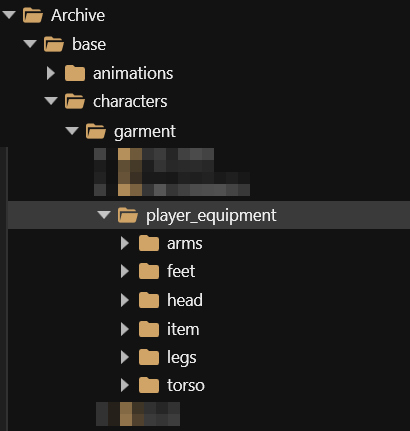
Some item properties are defined in the file `mesh_entity.ent` via **components**. If you use the wrong kind of entity, you might end up with your shirt being a puddle around your feet, or [string cheese](/cyberpunk-2077-modding/for-mod-creators-theory/3d-modelling/troubleshooting-your-mesh-edits.md#my-mesh-is-string-cheese-exploding-vertices-a-puddle-on-the-floor). To get around that, you need to make sure to pick a **file** that correspond's to your item's **body part.**
You can find all entity files under `base\characters\garment\player_equipment:`
Pick any file from inside the correct folder.
If you want to be super thorough, you can stick to the right gender
{% hint style="info" %}
If you want to know more about components, check the [wiki page](/cyberpunk-2077-modding/for-mod-creators-theory/files-and-what-they-do/components.md). This is completely unnecessary for the purpose of this guide!
{% endhint %}
## (Optional) Step 3: Hide it in First Person
You can hide items most easily via [ArchiveXL tag](/cyberpunk-2077-modding/for-mod-creators-theory/core-mods-explained/archivexl.md#camera-modes). Check the linked page for how to do that.
## Footstep sounds
To find the correct tags for footstep sounds, check [ArchiveXL: Tags](/cyberpunk-2077-modding/for-mod-creators-theory/core-mods-explained/archivexl/archivexl-tags.md) -> [ArchiveXL: Tags](/cyberpunk-2077-modding/for-mod-creators-theory/core-mods-explained/archivexl/archivexl-tags.md#footsteps-setting-footwear-sounds).
---
# Agent Instructions
This documentation is published with GitBook. GitBook is the documentation platform designed so that both humans and AI agents can read, navigate, and reason over technical content effectively. Learn more at gitbook.com.
## Querying This Documentation
If you need additional information that is not directly available in this page, you can query the documentation by asking a question.
Perform an HTTP GET request on the following URL with the `ask` and `goal` query parameters:
```
GET https://wiki.redmodding.org/cyberpunk-2077-modding/modding-guides/items-equipment/adding-new-items/different-equipment-slots.md?ask=&goal=
```
`ask` is the immediate question: it should be specific, self-contained, and written in natural language.
`goal` is what the user is ultimately trying to achieve, the reason they need the answer. Sharing it helps GitBook give you a better, more relevant answer. A goal is most helpful when it describes the outcome the user wants rather than restating the question. For example, with `ask=how do I create an API token`, a goal like `automate deployments from our CI pipeline` lets GitBook tailor the answer to that use case.
The response will contain a direct answer to the question and relevant excerpts and sources from the documentation.
Use this mechanism when the answer is not explicitly present in the current page, you need clarification or additional context, or you want to retrieve related documentation sections.